

Running the upi_rcv
Program
These instructions assume that you are running upi_rcv on a computer node
called target, and that IRIS is running on a computer called
host.
Running on a single computer is simpler.
-
Create the directory on target into which IRIS can copy products.
For example /usr/iris_data/UPI. The directory name is not important.
-
Copy
upi_rcvto the target computer (if it is different from where you compiled it) so it can run there. - Reset the mode after copying.
-
In the Setup utility, on the IRIS host system, create a new
network output device called ToUPI for sending products to the
upi_rcvprogram.For example:
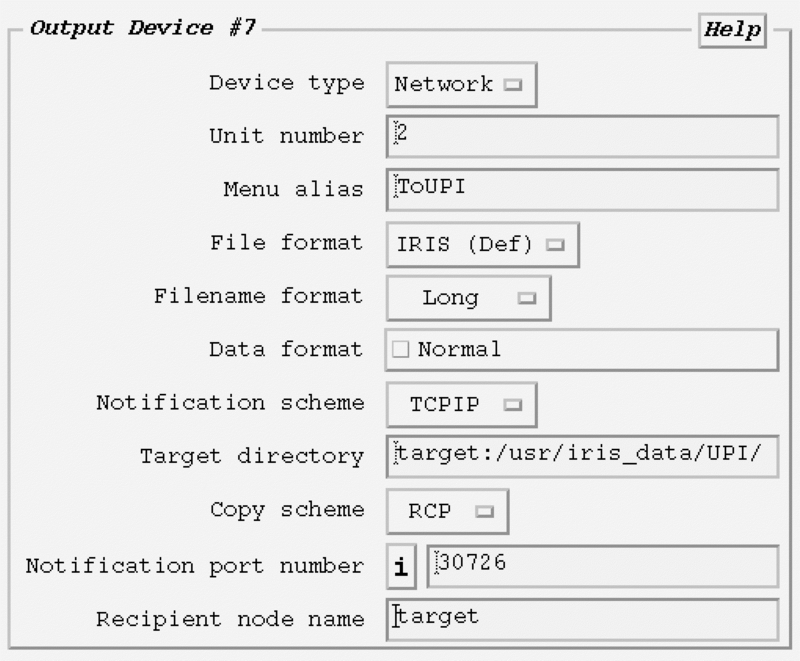
-
On the target computer, run the upi program:
$ upi_rcv -d /usr/iris_data/UPI
For example:
Initializing UPI receiver Connection established Received file: '/usr/iris_data/UPI/host950710171113.PPI' Connection closed - In , send a horizontal reflectivity product to ToUPI.