

Adding a Radar Site to Network Manager
Before adding a radar site to Vaisala Observation Network Manager:
- Make sure Network Manager is installed.
- Generate the Network Manager authentication key. See Creating Network Manager Authentication Keys.
- Make sure the radar hardware and software is installed, configured, and fully operational.
-
If you have not done so already, in the IRIS Setup utility,
select License and define the Site
Name.
See License and Site Information Setups.

You must choose the site name carefully.
If the site name changes, you must request a new license from Vaisala.

For existing sites, you can retrieve the site name from the terminal window by typing: show_machine_code - If you have not done so already, in the IRIS Setup utility, select License and enter the license information provided to you by Vaisala.
-
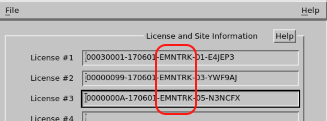
Provide the IRIS machine code portion of the license key you entered in the previous
step to Network Manager.
The following image shows an example of the machine code.
-
If you are configuring a new radar network, copy the iris2nm.in
file to the configuration directory with the following command:
cp /etc/vaisala/irisrda/templates/iris2nm.ini config/ -
Add the following information to iris2nm.ini:
- Network Manager IP address and port number, available from your system administrator
- Network Manager keys generated in Creating Network Manager Authentication Keys.
-
In iris2nm.ini, check the heartbeat value for
how often Network Manager expects status information from the radar.
The heartbeat parameter defines how often Network Manager expects status information from the radar as well as how often the radar should send status information to Network Manager.
The default value is 60 seconds.
-
In the IRIS terminal window, register the source, that is, the radar site, with Network
Manager by typing the command:
/usr/bin/iris2nm --registerRegistration provides Network Manager with the site name and co-ordinates based on settings defined in the Setup utility.
-
Start sending radar status updates to Nework Manager by typing the command:
systemctl start iris2nm.serviceThe
iris2nmservice runs in the background and sends antenna status to the network manager at a frequency defined by the heartbeat. -
To make sure the radar site has connected to the Network Manger and is and sending
status information, type:
usr/bin/iris2nmIf the connnection works correctly, the terminal displays textual information that is returned from Network Manager.