

License and Site Information Setups
 |
Licenses are machine-dependent. To get your license, call Vaisala with your machine code. To display the machine code, in the operating system prompt, type
If the machine code changes due to a change in the site name or if you install a new version of the operating system, you must request a new license. |
-
In the Setup utility, select
License.
The License and Site Information window opens.
Figure 1. License Setup Example 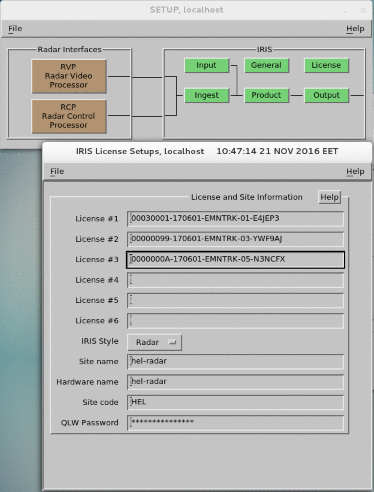
-
Check or update the license and site information.
- License #1 to #6
-
Type the software licenses you received from Vaisala, including operational and backup licenses and IRIS.
Also, if you are testing new features using a temporary license from Vaisala, IRIS automatically grants the cumulative features based on all of the licenses. When the temporary license expires, IRIS defaults to the original operational license.
The license file you receive from Vaisala includes a
Featuresand aProductslicense, and possibly anRDAlicense. These licenses can go in any of the 6 license fields, but Vaisala recommends using the first 2 fields for organizational purposes. These licenses consist of a 32-character string plus a user comment or description:XXXXXXXX-XXXXXX-XXXXXX-XX-XXXXXX comment - IRIS Style
-
Select a style to configure the menu selections and remove unneeded fields:
-
Radar
Full IRIS/Radar system.
-
Analysis
IRIS/Analysis systems.
-
- Site name
-
Type a site name using up to 16 characters.
The Site name is saved with the data and used in displays and printouts.
You must choose the site name carefully.
If the site name changes, you must request a new license from Vaisala.
- Hardware name
-
Normally this is the same as the Site name.
In a dual computer system in which 2 computers have the same IRIS site name, Hardware name indicates which computer is running.
When making status products, Hardware name is used as the site name.
- Site code
-
Type the site code for this site.
- QLW
-
Type a password of up to 15 characters.
Quick Look Window users must provide this password to access operator features.