

IRIS input setups
IRIS allows you to configure up to 16 input devices. Each input is a separate process watching a special directory looking for files to arrive. When a file arrives, the process invokes a conversion program, and adds the resulting data to the IRIS product inventory.
 | The netCDF and HDF5 input pipes require 16-bit data. |
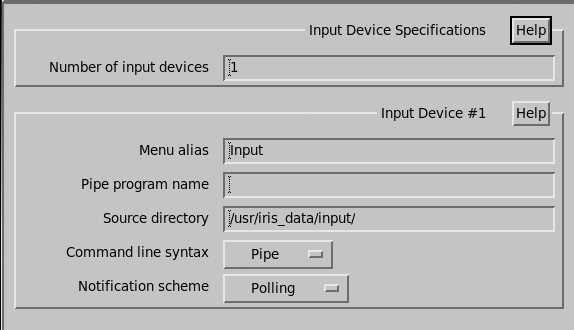
Number of input devices
Enter the number of inputs you wish to configure for your system. The maximum number supported is 16.
Menu alias
Enter a name for this input.
Pipe program name
Enter the name of a conversion program run when a file arrives.
IRIS checks for this program in the ${IRIS_PIPES} directory.
If you enter a blank name here, then it is assumed files are in IRIS product format, and are directly inserted into the inventory after byte swapping.
Source directory
Enter the directory to monitor for files.
Each input channel must have a separate directory. At startup, all files found in the directory are deleted. The input process then checks every few seconds for files. If it finds a file with the same size as last time, it runs the pipe conversion program and deletes the file.
All files starting with a "." are ignored. If you are copying between computers you should use "rename notification". In that scheme, the file is first copied to a temporary filename starting with at ".". After the slow copy is completed, the file is renamed to the final name. This prevents the input from reading a partial file. If the filename ends with .gz then gunzip is applied before processing. If the file name with .Z, uncompress is applied.
The following table shows the input pipes supplied with the IRIS system You may also choose to write your own. For more information, see the Antenna utility section of IRIS Programming Guide (M212927EN).
| Name | Supported product types | Supported data types | Syntax | Purpose |
|---|---|---|---|---|
Archive2toIris |
RAW |
Z, V, W |
||
BMPSatToIris
|
USER |
None (Image RGB or Grey Scale) |
Pipe | Converts satellite image to IRIS USER product. |
BufrToIris |
PPI, CAPPI, TOPS,
MAX
RAIN1, RAINN |
V, W, ZDR,
LDRh, Rain Rate, RAIN |
Pathnames | Converts WMO BUFR format to IRIS cartesian products using
OPERA guidelines |
HDF5ToIris |
Pathnames |
Converts The pipe is no longer officially supported. |
||
IMDSatToIris |
Pathnames |
Converts India Meteorological
Department (IMD) satellite data from The pipe is no longer officially supported. |
||
hdf52iris |
RAW |
Pathnames |
Converts OPERA HDF5 file to an IRIS RAW product. |
|
HDFSatToIris
|
USER |
Pathnames | Converts HDF4 satellite image to an IRIS USER product. |
|
KmaRadToIris
|
CAPPI |
Pipe | Converts an array to an IRIS CAPPI product. | |
KmaSatToIris
|
USER |
Pipe | Converts satellite image to IRIS USER product. | |
KnmiHDF5ToIris |
Pathnames | |||
odimhdf52pb |
Converts ODIM HDF5 2.4 polar data to IRIS Focus
protobuf format. |
|||
odimhdf52raw |
Converts ODIM HDF5 2.4 polar data to IRIS Raw
format. |
|||
pb2raw |
Converts IRIS Focus protobuf format to IRIS
Raw format. |
|||
PBMSatToIris
|
USER |
Pathnames | Converts a PBM, PGM, or PPM
satellite image to an IRIS USER
product. |
|
PictureToIris
|
IMAGE |
None (Image RGB or Grey Scale) |
Pathnames | Converts, for example, TIFF files to IRIS IMAGE product. |
RainbowToIris
|
RAW |
T, Z, V, W,
ZDR, |
Pathnames |
Converts Gematronik Rainbow format to an RAW product. The pipe is no longer officially supported. |
UfToIris
|
RAW |
T, Z, Zc,
V, w, SQI, ZDR,
PhiDP, KDP, RhoHV,
LDRh, LDRv |
Pathnames | Converts UF format to IRIS RAW product. |
Command line syntax
Use one of the following options to determine how IRIS runs the pipe program:
-
Pipe:
pipe-pathname input-filename <input-pathname >outputpathname -
Pathnames:
pipe-pathname ip:input-pathname if:input-filename op:output-pathname
Notification scheme
Use one of the following options to determine how IRIS detects that a new file has arrived:
-
Polling:
IRIS checks every few seconds to see if a new file has arrived. If the file size is the same as last time it checked, then the file is processed.
-
TCP/IP Socket:
IRIS expects to receive a socket message on the specified port number every time a file arrives. This allows immediate input without the delays due to a polling period.
The socket message syntax is the same as for a normal IRIS network receiver, that is
FILEfollowed by the filename and a null.