

IRISnet Overview
The IRISnet menu provides a status monitoring and user interface for IRIS network features.
The following example shows a network architecture with radar sites and a central site with a number of displays, an analysis computer, and a Net Manager.
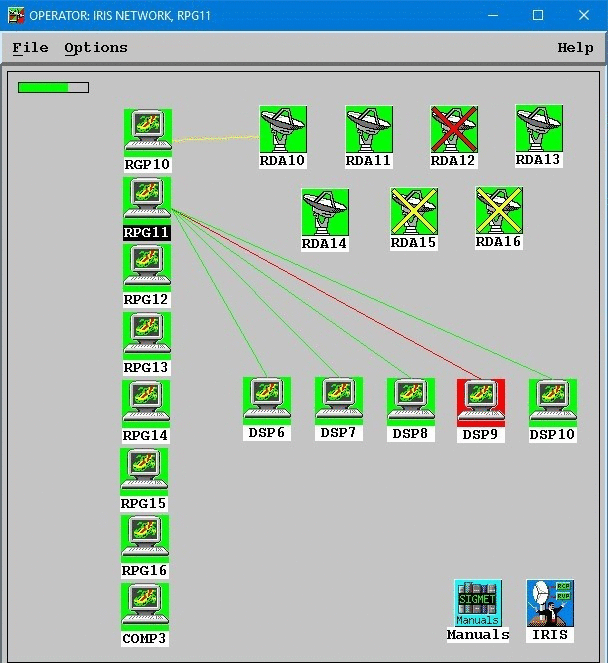
Node Icons Symbols and Color Status Indication
There are 2 types of node icons in IRISnet:
- Radar Sites– Workstations that run IRIS/Radar software. These nodes have signal processors that collect data from the radar. In the case of an active IRIS control system, these nodes also have a radar control processor (RCP).
- Analysis/Display Sites– Workstations that are run either IRIS/Analysis or IRIS/Display software.
Each network node has a color indicating its status:
- Green - IRIS is running on the node.
- Yellow - IRIS is not running on the node because, for example, the node is turned off or disconnected from the network.
- Red - The node is mis-configured with an invalid hostname or the network host cannot be reached.
Each green IRIS site node can show two types of fault alarms:
- Red cross - Critical error, such as Radar process turned off or BITE fault.
- Yellow cross - Non–critical error.
The Message Summary menu of each system lists critical and non-critical faults.
Network Connection Lines and Color Status Indication
Each node may have one or more network connections to the other nodes. These are indicated by lines that are color–coded to indicate status:
- Green - Communication between the nodes is OK.
- Red - There may be a problem with the line or with the node.
-
Yellow - The communication line cannot be sensed from your location.
This depends on how communications are routed through the nodes. In the example figure, the IRISnet menu is run from the RPG11 workstation. The line connection Products to Display is shown as yellow.