

RCP I/O Summary
Select , the Antenna utility displays a summary of the information gathered by the antenna process.
When the IRIS or Antenna utilities first run after boot-up, an internal antenna process starts in the IRIS host computer. This process monitors I/O to the RCP, runs until it is stopped by a qant command or until the computer shuts down.
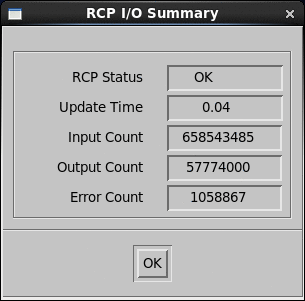
- RCP Status
- The status of the RCP, either OK or Shutdown.
- Update Time
- The time in seconds since the last update was received from the RCP by the antenna process.
- Input Count
- The total number of bytes read by the antenna process since it was started.
- Output Count
- The total number of bytes written.
- Error Count
- The total number of bytes received that were discarded because of an error.