

Using the Digital Target Simulator
Use the digital target simulator with Ascope to simulate weather and clutter targets in the host workstation.
The digital target simulator can simulate up to 4 point targets. You can set the parameters of each target independently.
The simulator and its control panel start.
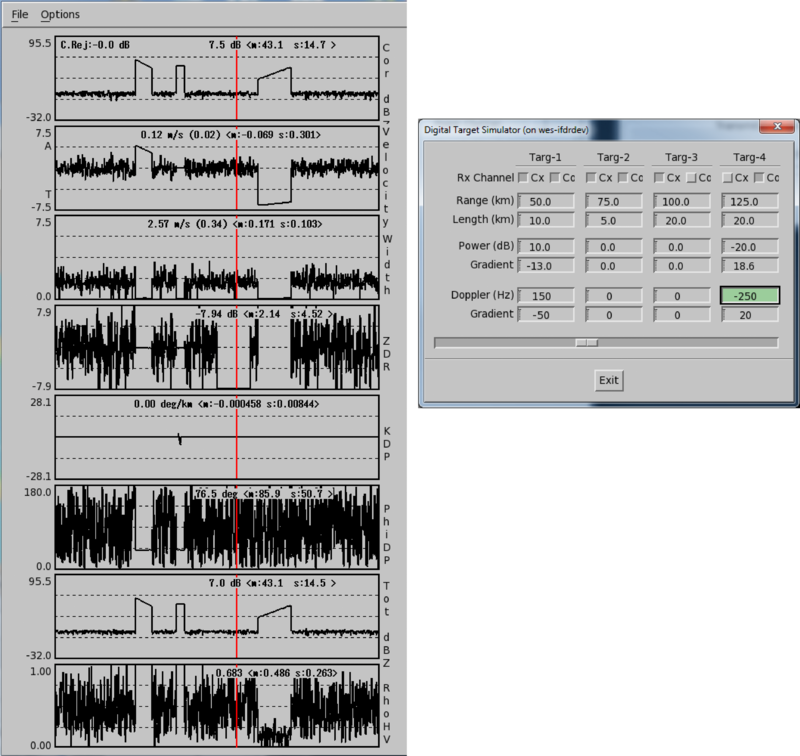
- Cx
-
Select Cx to indicate that the target impacts the data from the cross-polarization Rx channel (vertical polarity).
- Co
-
Select Co to indicate that the target impacts the data from the co-polarization Rx channel (horizontal polarity).
- Range (km)
-
How many km it will affect after the starting range
- Length (km)
-
How far away from the radar the object is.
In the example plot, this is shown in the trapezoid changes. A range of 50 and a length of 10 km indicates the target occupies the range bins between 50 ... 60 km.
- Power (dB)
-
Signal power of the target.
- Gradient
-
How much the power changes over the range of the target.
For example, a Targ-1 target between 50 ... 60 km with the Power of 10 and the Gradient of -13 dB starts at the signal power of 10 dB @ 50 km and then drops 13 dB down to -3 dB at 60 km.
- Doppler (Hz)
-
Doppler frequency of the target in Hz.
- Gradient
-
How much the frequency changes over the range of the target.