Configuration and monitoring
RVP10SRV radar server computer stores the setup configuration on a disk.
You can access setup information locally or remotely, over the network. For multiple radar networks, you can manage the configuration centrally by copying tested master configuration files to the network radars.
Boot-up process
During the boot process, RVP10SRV is first loaded with a factory configurable diagnostic image.
The diagnostic image initializes devices that need initialization, and leaves the board in a reset condition. It verifies that the RDA software and setup configuration is present and uncorrupted. Once validated, the diagnostic image boots the RDA application.
The application image runs basic memory self-tests before starting.
Monitoring
The platform monitors:
- voltage
- temperature
- locked conditions of the PLLs on the FPGA to verify that the analog and digital clocks are in good health.
IP address configuration
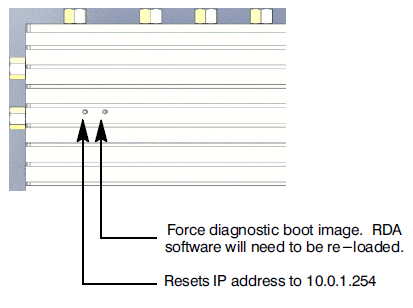
The RVP10SRV IP address is user-configurable.
 | If you forget the programmed IP address, you can use the outer most hole (SW2) in the finned side of the enclosure to reset the IP address to 10.0.1.254. |