

Plot test pattern (P+)
You can use the P+ command to generate a simple test pattern and verify that the display software works properly.
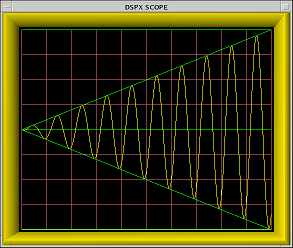
-
In the TTY monitor, type: P+
This prints the message Plotting Test Pattern... on the TTY and then produces the plot shown in the following figure. The display is an overlay of the following strokes:
- Bottom line
- Middle line
- Top line
- Line sloping up
- Line sloping down
- Sine wave pattern that changes phase with each plot so that it appears to radiate from the left side of the display.
- When you are satisfied that the plot is drawn correctly, type Q or press ESC to return to the TTY monitor.