

Archive Log Area
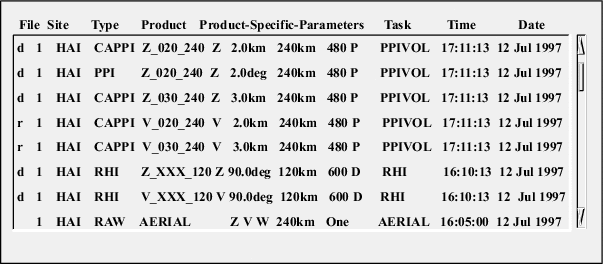
The archive log area shows a list of files that are on the archive. This list is used for specifying files for a retrieve operation or verifying the progress of a record operation.
For tapes, the order of the list is the same as the order of the files on the tape. Usually, they are in chronological order.
For optical disks, the files appear in the same order as in the Product Output menu.
Archive logs are maintained on disk as ASCII text files.
When a tape is mounted, IRIS checks to see if there is a corresponding tape log. If the tape is a valid IRIS tape, the list is displayed.
In the case of optical disk, a new log is generated when a disk is mounted.
File
This column contains status information about the file. The first column displays the sequential tape file number (1, 2, ... ) and the second column contains one the following symbols:
-
rThe file has been tagged for a retrieve operation.
-
dThe file is on disk as well as on tape. Retrieve is not permitted.
-
"blank"
The file is on tape only and has not been tagged for retrieve.
Right-click File to select one of the following options:
-
Retrieve marks a file for retrieval.
-
Cancel unmarks the file.
Site
Shows the ID of the radar site where data for the product was collected.
Type
Shows the type of the product, such as PPI or RHI.
Product
Shows the product name for the most recent generation of the product type.
Product-Specific-Parameters
Shows additional information about the product.
TASK
Shows the name of the associated task.
Time
Shows the date and time (local time) when data for the product was collected.