

Assigning an Overlay to a Radar Site
The IRIS system manager associates a default overlay file for each site connected to the system. You can assign a different overlay to the site.
-
In the Overlay menu, highlight the site you want to
change.
A list of available overlays is shown.
The following figure shows an example with 2 overlays for the HEL site: HELSINKI and KARTTA.
Figure 1. Site Overlay Example 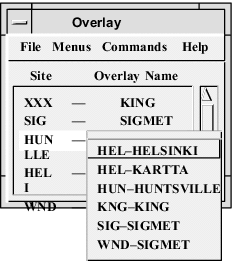
-
Select an overlay from the list.
The menu also shows the site IDs for which the overlay is valid.
If you try to display a product with an invalid overlay, IRIS displays the message, Overlay origin more than 1000 km from radar location (1000 km = 621.4 mi). If you get this message, check that the correct overlay is assigned to the radar site.