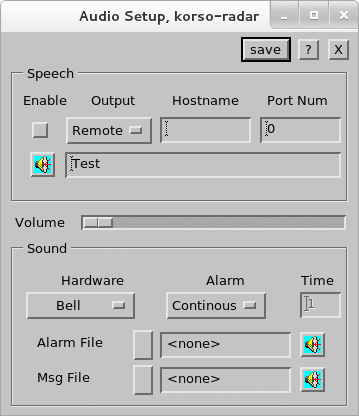
Managing Audio Settings Figure 1. Audio Setup Select Tools > Audio Setup. Configure speech options in the Speech panel. Select or deselect Enable to enable or disable all speech originating from your local workstation. Define the sound output settings Select Local to output to the sound card in your workstation. Select Remote to the specified PC using the specified port number.For remote output, enter the Hostname of the workstation.For remote output, enter the Port Number. The recommended value is 30731. Select Test to send the test string on the menu as a spoken output. Use the slider to control audio volume. Configure sound options in the Sound panel. Under Hardware, if you have a sound card, select Sound Card. If you do not have a sound card, select Bell. Under Alarm, select Continuous or Timed alarm. For timed alarm, select the time (in seconds) for how long beep, honk, or other sound you want to hear. For Alarm File, select the .wav file you want to hear when IRIS gives an alarm message. The loudspeaker icon plays a sample to help you choose. The alarm messages are tagged in the message summary menu with an s (spoken). The options are available only if you have a sound card. For Msg File, select the .wav file you want to hear when IRIS gives a non-alarm message. Select Save.