

Product Scheduler Menu
The Product Scheduler menu tells IRIS when to generate a product for automatic or manual operation.
Because the product generation affects host computer resources, this menu can be viewed but not controlled by an IRIS observer.
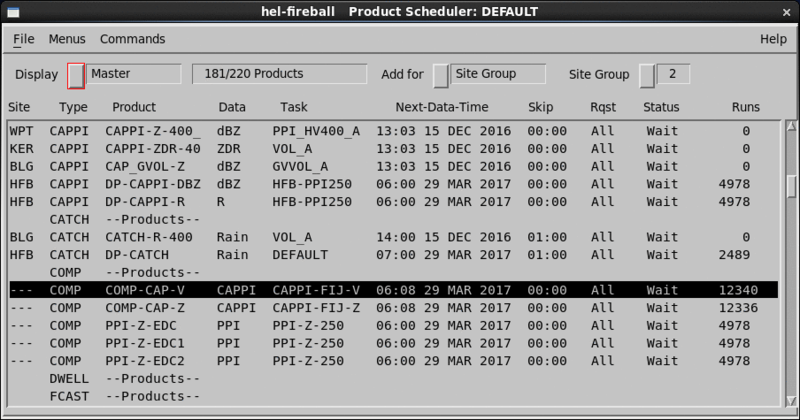
- Site column
-
Shows the site for each scheduled product. A product runs only if data from that site comes to IRIS, either from the radar, over the network, or from a tape.
If the Display field is set to Master (the Master Schedule), there is only one product entry, regardless of the number of sites scheduled.
Right-click the mouse to show a menu on the site column listing all sites with a * symbol next to each site for which the product is scheduled.
Select an entry to add or remove the * tag. This makes the Master Schedule convenient to use for adding or deleting sites from the schedule.
- Product column
-
Shows the name of the product.
- Data column
- Shows the data parameter configured for the product.
- Task column
- Shows the name of the associated task.
- Next-Data-Time
-
Scheduling operates under the concept of data time, the time when a task starts collecting data. For an on-time task schedule, the data time corresponds to the time when a task is scheduled to start.
When you schedule a product, set the Next-Data-Time field for the product generator to process only associated tasks with data times later than the next data time.
- Skip
-
The Skip time breaks the day into equal intervals of time starting from midnight. A product is generated, at most, once for each skip time interval. The first occurrence of data from the associated task is used for each interval.
- Request
-
Schedules a product according to whether the schedule affects All, Next occurrences of the product. You can also stop the product's schedule.
- Status
- Shows the current status of each product as
Running (product is being generated) or
Wait (product is waiting for either the associated task to run,
for its turn to run pending the completion of other products, or the product is not
scheduled to run).
After a product is generated, the status changes from Running to Wait.
When the Master Schedule is displayed, Status shows the status of the site which is either currently running or ran most recently.
- Runs
-
A counter (
000to999) showing how many times the product has run since it was loaded in the menu.If the number of runs exceeds
999, the counter restarts at000.If you stop a product, the counter is not reset. The counter resets if you delete a product and reload it into the schedule. If you load a new schedule, the counters for all products are reset.
When the Master Schedule is displayed, the Runs field reflects the total number of runs for all sites that are scheduled.