

Data Flow for Ribbon Display Generation
The primary function of the TDWR processing is to output ribbon display messages to controllers (accompanied by audio warning tone).
The standard IRIS output and display features are also used to construct images for the Situation Displays (SD's), that is, simplified displays showing runway warning areas (arenas), alert centroids and shear lines with forecast positions. Since the SD's are normal IRIS displays, other IRIS products can also be displayed.
Ribbon displays are generated when the local IRIS (the IRIS where the ribbon display is connected) receives a special TDWR product.
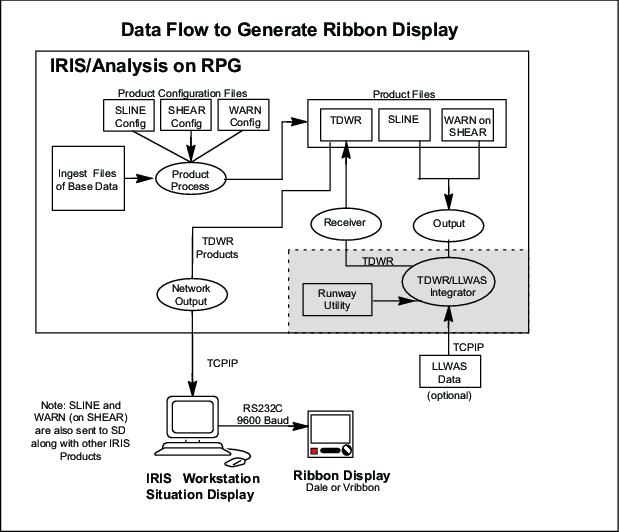
Normal IRIS product generation makes SLINE and WARN products for radial shear (microburst warnings). These products have all possible protected areas turned on, even for inactive runways.
The results are sent to a separate TDWR/LLWAS Integrator. The Integrator takes data from LLWAS (if available) and configuration information on the current active runways from the runway utility. The output back to IRIS is a TDWR product that is filtered so that only the information required by the ribbon display is present. The integration algorithm is the FAA/MIT Lincoln Lab algorithm that was developed for the U.S. FAA TDWR.
Usually both IRIS and the Integrator run on the RPG, although it is possible to run the TDWR/LLWAS Integrator on an SD. This would, however, lead to configuration chaos since there are likely to be many SD's.
The RPG then outputs the TDWR product to the SD's and when it is received, it is automatically formatted into a ribbon display message and sent out the SD serial line.
The process that outputs the products to the RBDT's has an additional configurable filter: The controller can specify which corridors are displayed on an SD. Use the ribsetup to configure this.