

IRIS Hardware
Workstation
IRIS runs on computers with a Linux operating system.
The workstation can run the IRIS processes and menus and functions as an output device for IRIS products.
Radar signal processor
Radar signal processor (RVP) software triggers radar measurement by producing the trigger signal for the transmitter using the intermediate frequency digital receiver (IFDR) unit in the receiver.
After the IFDR unit has digitized the received echo signal into samples (I and Q data), the RVP processes the data in the radar server computer using computations such as:
- Converting the received signal amplitude into calibrated radar reflectivity values
- Doppler processing to filter out ground clutter and compute radial velocities
- Polarimetric processing to classify the measured hydrometeors and to apply attenuation correction.
The end product of the RVP process is a radar ray, where selected radar data from a certain short time interval is stored as a function of range.
Parameters configure signal processing, such as pulse repetition frequency, range resolution, and Doppler filter parameters. You can select these either directly when running RVP as a standalone or through the IRIS software when IRIS controls the RVP process during automatic weather radar measurements.
Radar control processor
Radar control processor software
RCP software steers the radar antenna in the defined measuring direction to read the azimuth and elevation angles from the angle encoders. The angle values are combined with the output of the RVP signal processing to display measured radar data as a function of azimuth, elevation, and time.
RCP software displays status information, such as the status and faults of radar system units as well as the controls for switching the transmitter radiation on and off.
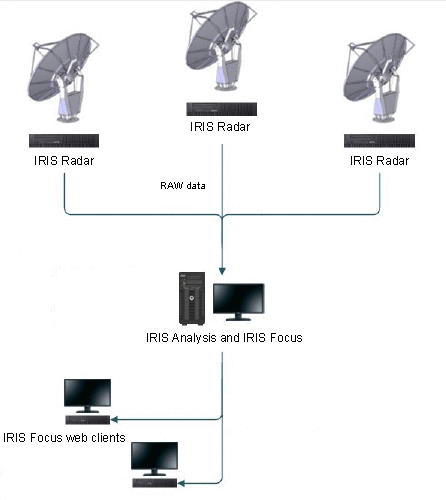
IRIS Network Connections
Color Printer and Output File Formats
An optional color printer provides hardcopies of products, prints tape/DVD disk inventories, and supports other system maintenance and documentation. Color postscript printers are supported.
The output files can be formatted as IRIS Native, TIFF with optimal compression, BMP, GIF, JPG, Postscript, or Compressed serial link format.
Installation media
A DVD or a USB drive is used for IRIS installation.
Archive/retrieve is supported on DAT tape, DVD+RW drivers, and large disk archives (LDAs) on a local or remote hard disk.