

Invoking setup and built-in error checking
When IRIS starts, it performs configuration and bounds checks.
For new users, the Setup parameters are typically correctly set and do not cause any configuration errors. If an error does occur, follow these steps.
-
In the terminal window, type: setup&
The Setup utility launches.
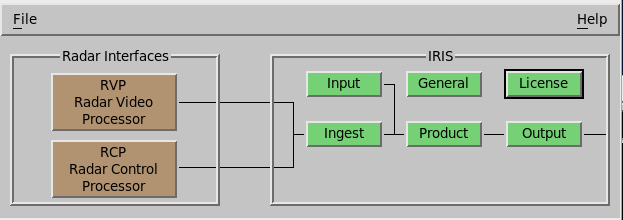

There are 2 variants of the Setup utility: one for IRIS and one for the RDA (RVP signal processor or an RCP8 antenna controller).
The RDA variant does not show the IRIS setup features.
- Select the part of the system setup you want to check or configure.
- Make your changes and close the window for the selected part of the system.
-
Select .
The configuration files are now updated.
-
To create a listing file of the Setup configuration:
-
To take the configuration changes into effect, restart the application:
License changes can affect RVP and IRIS.
-
If an error list is displayed,
- Check the error list for parameters that you have customized and correct these customizations.
- Select Repair to make corrections that are necessary for the software but do not need to be customized for your operation.
- Select .