

General Bitex Customization Options
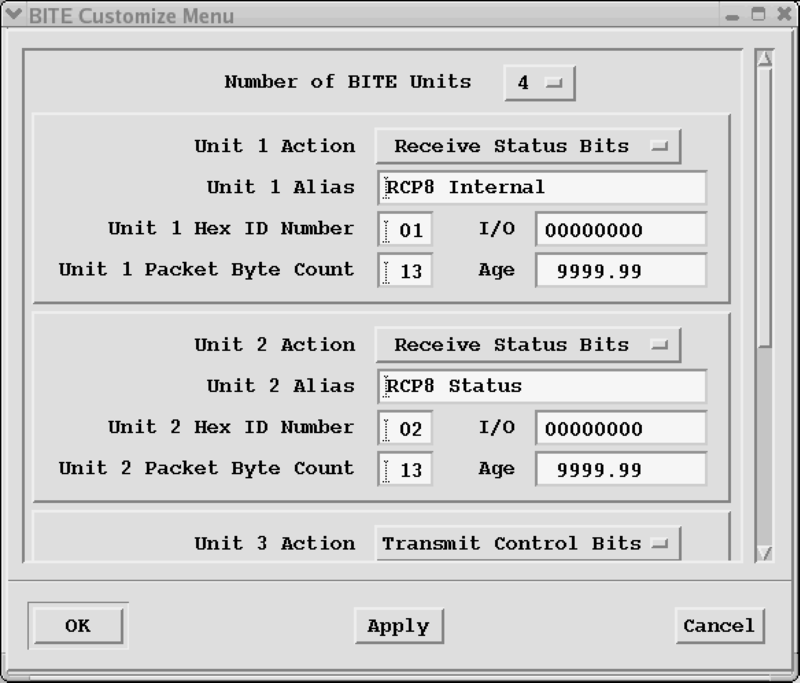
To display the BITE Configuration menu, choose . This menu is used to change the format of the BITE packet transmission and reception over the network communications stream. In normal operation, this menu is not needed. To protect against inadvertent changes, you must be in setup mode to make changes.
- Number of BITE Units
- Select from 1 to 16 BITE units. The number of units and the characteristics of each unit displayed in the menu changes reflecting the setting of the Number of Units.
- Unit Action
- The choices for Unit Action are Receive Status Bits, Receive Status QBITE, or Transmit Control Bits. Each of the units is configured independently. If the RCP is configured to send status information to IRIS for this unit, the Unit Action in Bitex should be Receive Status Bits. Any data point configured for this unit then displays status information.
- Unit Alias
- This name is used on the Interrogate menu to identify the purpose for the different BITE units.
- Unit Hex ID Number
- Each BITE unit has an identification byte (displayed in hex) which determines the meaning of this packet. Unit IDs configured in bitex should match Unit IDs configured on the RCP. Transmit Unit IDs are independent of Receive Unit IDs, thus they may share the same Unit IDs. But within Transmit IDs or Receive IDs, the unit numbers must be unique.
- Unit Byte Count Packet
- For each BITE unit, you must specify the number of bytes expected in each packet, from 4 to 128. These numbers must match those configured on the RCP for each BITE unit.
- I/O
- A display-only field showing the number of characters received from or sent to that particular BITE unit.
- Age
- A display-only field showing the time in seconds since the last packet for this particular unit was received or transmitted.