

Modes and Protocols
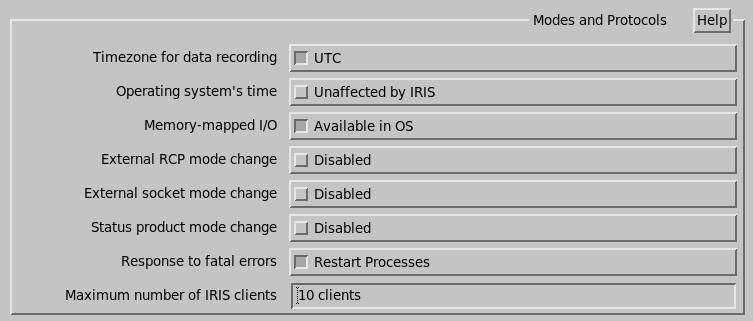
- Timezone for data recording
-
Controls if the task schedule and the product schedule run on UTC or on local time as well as the times shown in the menus and in the file names.
In both cases, you should set your computers system clock to the correct local time zone.
In both cases, IRIS records all the information needed to display the data using either UTC or local time.
If set to Local Time, you must use a local time zone that does not switch to and from summer time.
If set to UTC, it is OK to have the summer time switch.
- Operating system's time
-
Select Select from RCP to indicate whether the INGEST process should set the system time from the RCP serial line time reports if the time difference is 2 ... 20 seconds. For higher values, it signals a message.
If your RCP does not report the time, select Unaffected by IRIS.
- Memory mapped I/O
- Select either Available in OS for most systems or unsupported for HP9000/800, which does not support a memory mapped I/O file.
- External RCP mode change
- Answer enabled if you want to allow the RCP to control the IRIS configuration that is loaded into the Radar Status menu. This is only available on radar systems, set to disabled on analysis systems. If enabled, then the External socket mode change feature below is not available, and the automatic mode switch button on the Radar Status menu is not manually controlled.
- External socket mode change
- Answer enabled if you want to allow socket messages to control the IRIS configuration that is loaded into the Radar Status menu. If enabled the automatic mode switch button on the Radar Status menu is not manually controlled.
- Status product mode change
-
Answer enabled if you want to slave your system's mode to another IRIS system. When a status product arrives from the selected system, your IRIS changes to match the mode. This is used for redundant system switching. If enabled, you see:
-
Supplied by (Site Code)
Enter the site you wish to slave to.
-
- Response to fatal errors
- Select Restart Processes or No Action to indicate whether you want IRIS processes to restart automatically after a fatal error occurs.
- Maximum number of IRIS Clients
-
Enter the maximum number of IRIS client menu programs that can be connected to the IRIS server at one time. A suggested value for this is 10.
IRIS takes about 30 seconds to free a client slot upon disconnection, so this parameter should be set slightly larger than the actual maximum number you want.
The menus display the message IRIS is not running on the selected node if the client table is full.