

File and System Quotas
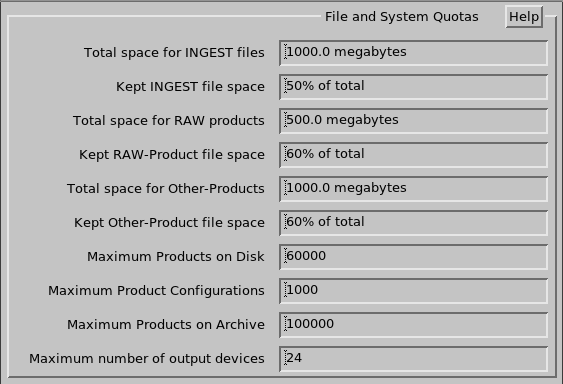
- Total space for INGEST files
-
When the
INGESTdata exceeds this level, old data is automatically deleted.It is important to keep at least 10 % of the disk free when the
INGEST,RAW, and other product files have reached their maximum usage.To estimate the available space for these files, delete all the files, then find out how much disk space is available by typing df.
- Kept INGEST file space
-
Enter the percentage of the total disk space that can be used for kept ingest files (files that cannot be deleted by the Watchdog process). When the kept files exceeds this quota, the oldest are deleted first.
A reasonable value is 50 %.
- Total Space for RAW Products
- When file space used by
RAWproduct data exceeds this level, old data are automatically deleted. - Kept RAW-Product File Space
-
Enter the percentage of the total disk space that can be used for kept raw product files. When the kept files exceeds this quota, the oldest are deleted first.
A reasonable value is 50 %.
- Total space for Other-Products
-
When the file space used by non-RAW product data exceeds this level, old data are automatically deleted.
- Kept Other-Product file space
-
Enter the percentage of the total that can be used for kept product files. If the kept files exceed this quota, the oldest are deleted first.
A reasonable value is 50 %.
- Maximum products on Disk
-
This is the maximum number of products which allowed on the disk at one time. It is used to allocate memory for the inventory.
A typical value is 10000.
- Maximum products on Archive
-
This is the maximum number of products allowed on an archive media. Configure this dependent on your media capacity.
A value like 20000 would be a good starting point.
- Maximum number of output devices
-
Enter the maximum number of output devices that can be entered in the field (see Output Device General Specifications).
The larger the value, the longer it takes for IRIS to startup. For example, if you have up to 10 output devices, IRIS starts very quickly at startup time. If 200 output devices are required, IRIS takes longer to startup.
If the number of configured devices is exceeded, you receive an error message:
