

Radar Status
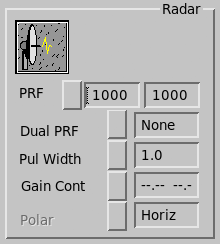
- PRF
-
Shows the current PRF selection in pulses per second.
- The left box shows the requested PRF.
- The right box shows the measured PRF.
You can set these fields to any number between the minimum and the duty cycle limit, or choose a value from the menu (Options are: 250, 300, 500, 600, 1000, 1200).
In configurations using an external trigger these numbers may differ.
The value shown is the higher PRF if dual PRF is selected.
The PRF should be set to 300 or greater when using alternating polarization.

Ascope automatically limits the PRF to be within the duty cycle limit of the transmitter as configured in the Setup utility.
You must run the Setup utility before running Ascope.
- Dual PRF
-
For automatic velocity unfolding. This field shows None, 3:2, 4:3, or 5:4.
When you change this value, the velocity limits on the data plot are changed appropriately. Note that the PRF displayed as part of the status is the higher PRF rate.
If any plots require time series, Dual PRF is set to None (no unfolding). There is no unfolding when I, Q, L, AI, AQ, ALOG, or Spec displays are plotted.
- Pulse Width
- Shows the current pulse width in microseconds. You can change he pulse width can be changed by selecting an option from the menu.
- Gain Control
-
Shows type of gain control used.
Select this field to change the gain control scheme. In the Gain Control menu, select one of the following:
-
AGC
Automatic gain control
-
STC
Sensitivity time control
-
Fixed dB
Gain at a fixed level of attenuation.
When you choose Fixed dB when you are running in IAGC mode, you can enter 1 ... 3 dB levels. Ascope cycles between these settings.
Select OK to close the menu.
-
- Polarization (available with ZDR option)
- Displays the transmitted polarization and lets you set the polarization and switching scheme. Box is desensitized on single polarization systems.