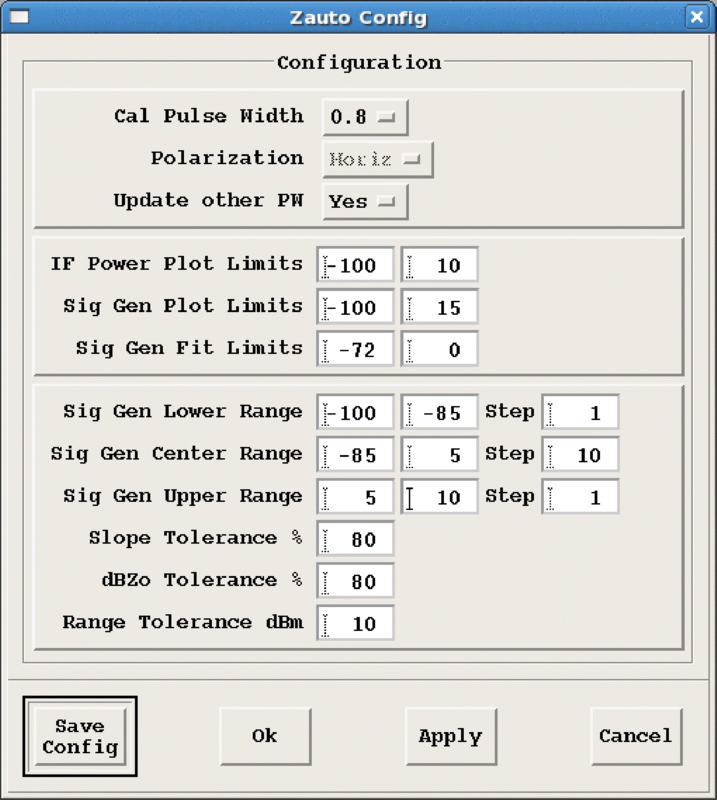
Define the automatic calibration procedure parameters:
Cal Pulse Width
Select the pulse width to be calibrated automatically.
Update other PW
As an alternative to recalibrating for each pulse width, choose
Yes to copy the results of a calibration at one pulse width
to other pulse widths, scaled by the different radar constants for the 2 pulse
widths. For the most accurate results, however, the radar should be re-calibrated at
each pulse width.
Polarization
Only to be changed for dual polarization radars.
IF Power Plot Limits
The range of measured signal plotted on vertical axis.
Sig Gen Plot Limits
The range of signals to be plotted on horizontal axis.
Sig Gen Fit Limits
The range to be included in the least squares fit.
Siggen Steps
This controls interval between generated signals. We may want to fine
steps at the 2 roll-off regions in order to get an accurate measure of the dynamic
range. Thus you can enter steps for 3 different power ranges.
Slope and dBZo Tolerance %
These are positive integers between 1 and 100, used for the
comparison with the reference calibration information during an automatic
calibration. If the new calibration differs by more than these percentages, AutoCal
does not update the calibration.
Range Tolerance dBm
If the dynamic range changes by more than this value, alert and do
not update.