Zauto results
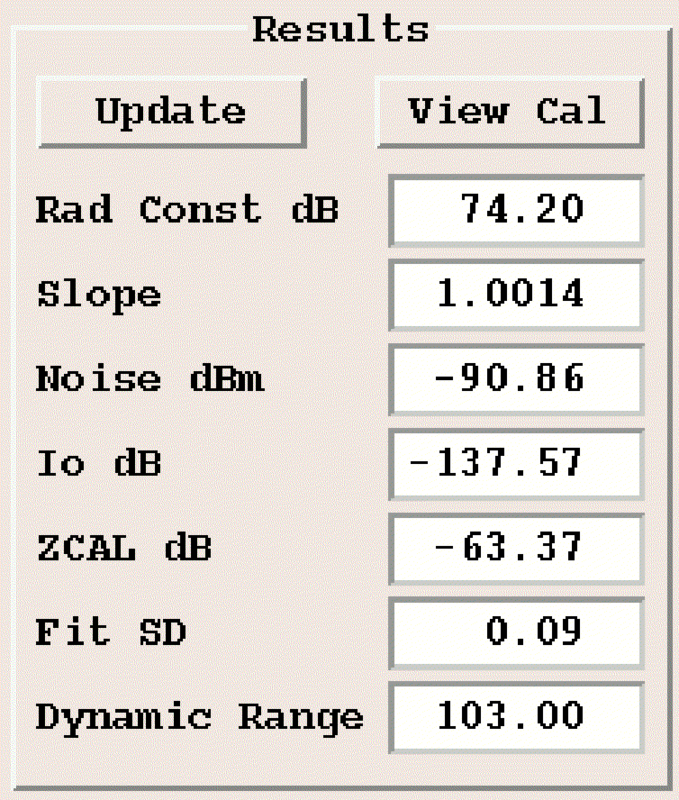
The Results pane shows the temporary calibration information such as the current slope and dBZ or Zcal values for the specified pulse width. These values apply to the most recent squares fit and noise sample. This pane is updated every time a new noise level is taken, or any time the data used for linear fit changes.
- Update
- Select Update to store the current calibration for the selected pulse width. The slope result is copied regardless of pulse width. The calibration reflectivity is copied over for the specified pulse width.
- Radar Constant
- Displays the calculated radar constant. See RVP10 User Guide (M212604EN).
- Slope
- Displays the slope of the straight line fit to the data values in dB per machine number (A/D value) The slope should be close to 1. Less than 1.02 is a reasonable threshold. If a reasonable value is not acquired, adjust the fit range limits.
- Noise
- Displays the noise level in dBm.
- Io
- Displays the calibration intercept.
- ZCAL
- Displays the
Zcalvalue computed from the radar equation. See dBZo in RVP10 User Guide (M212604EN). - Fit SD
- Displays the standard deviation on the least squares fit in dB. This should be under 1 for a good fit. If a reasonable value is not acquired, adjust the fit range limits.
- Dynamic Range
- Displays the dynamic range of the processor at this pulse width. The dynamic range is defined as the difference in input signal power between a signal measuring at least 1 dB above the noise level, and a signal which is starting to saturate the receiver such that we have 1 dB roll off from the idealized linear fit.
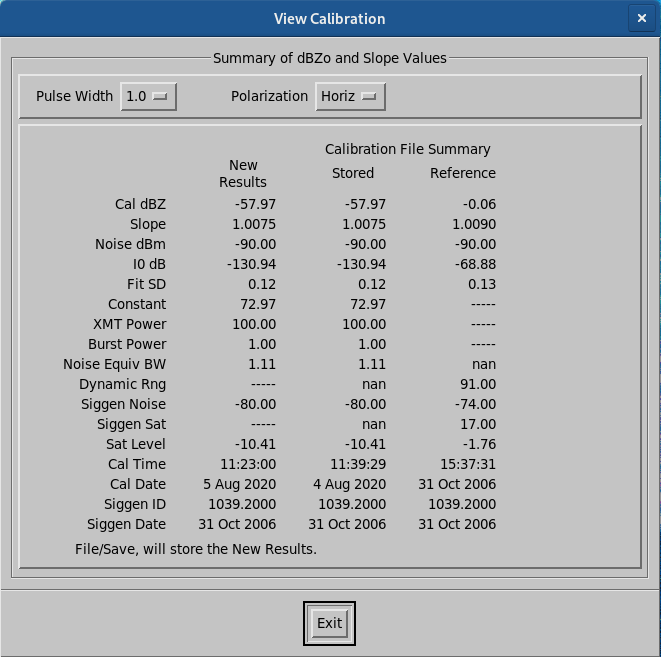
- View Calibration
-
Select View Calibration to show a list of current results, the last results saved to a file, and the reference calibration set by the Zcal utility.
Select Exit to close the window.