

Network-specific parameters
You configure network parameters in .
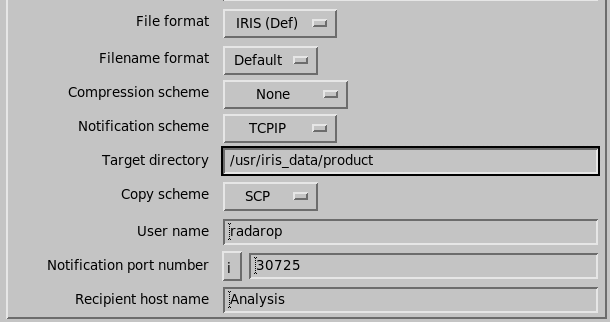
File format
Enter the format of the file transferred. The recommended format for IRIS-to-IRIS transfers is IRIS.
| Choice | Description |
|---|---|
| IRIS |
File copied without conversion. |
| NORDRAD1 |
File converted to
|
| BMP | - |
| GIF | - |
| TIFF |
TIFF format with GeoTIFF header
information, you can view the GeoTIFF information with |
| JPEG | - |
| PNG | - |
| Postscript | - |
| None |
File is not copied. Notification is sent. |
| Pipe |
User-specified pipe program Pipes are programs are run separately from IRIS. This gives flexibility because you can install your own, and you can upgrade the program without interrupting IRIS. Note that detailed error messages cannot be signaled to the IRIS error log. Instead, a generic fault signal is logged saying to look for an error log file. These pipes write a *.log file in the ${IRIS_LOG} directory. The pipe configuration tuning cycle consists of:
|
| Header |
File header is copied. |
Pipe program name
This parameter is shown if you select a pipe file format.
You can specify the name of a user supplied pipe program used to format the output file. The program must be placed in the ${IRIS_PIPES} directory.
The following table shows the output pipes supplied with IRIS.
For information on writing your own pipe see IRIS Programming Guide (M212927EN).
| Name | Supported Products | Supported Data Types | Syntax | Purpose |
|---|---|---|---|---|
cfrnc2iris |
Converts NetCDF CfRadial 2.0 to IRIS Raw |
|||
cfrnc2iris_focus
|
Converts NetCDF CfRadial 2.0 to IRIS Focus
protobuf format |
|||
IrisToAdids |
PPI, CAPPI,
TOPS, BASE, MAX,
RAIN1, RAINN, SRI,
VIL,VIR, LAYER,
HMAX,SHEAR |
T, Z,
Zc, Ze, V, Vc,
W, SQI, ZDR,
ZDRc, PhiDP, KDP,
RhoHV, LDRh, LDRv,
PhiDPh, PhiDPv, HCLAS,
VIL, Rain Rate, RAIN,
H, SHEAR, SNR |
Pipe | Converts IRIS product to ADIDS
format. |
IrisToArchive2 |
RAW |
Z, V,
W |
Pathnames | Converts IRIS RAW product to NEXRAD
Archive2 format. |
IrisToAsterix |
Pipe | Converts IRIS product to Eurocontrol ASTERIX
format. |
||
IrisToBufr |
BASE,PPI,
CAPPIHydroClass,HMAX,MAX,
RAIN1, RAINN,RAW,
RHI, SRI,VVP,
VIL, VIR, TOPS |
V, W,
ZDR, LDRh, Rain Rate,
RAIN |
Pipe | Converts IRIS cartesian product to WMO BUFR format
using OPERA guidelines. |
IrisToEwis |
RAW |
Converts IRIS to EWIS format |
||
IrisToGrib1 |
CAPPI,
TOPS, BASE, RAIN1,
RAINN, SRI, VIL,
HMAX, USER |
Z, V,
W, ZDR, Rain Rate,
RAIN, H |
Pipe | Converts IRIS Cartesian product to WMO GRIB version
1 format. |
IrisToHDF5 |
PPI(NORDRAD),
CAPPI, TOPS, MAX,
RAIN1, RAINN, RHI
VVP, XSECT, RAW |
Z, V,
W, SQI, ZDR,
PhiDP, KDP, RhoHV,
LDRh, VIL, Rain Rate,
RAIN, H |
Pathnames | Converts IRIS product to HDF5 format
using NORDRAD2 guidelines. |
IrisToMcIdas |
PPI, CAPPI,
TOPS, BASE, MAX,
RAIN1, RAINN, SRI,
VIL, HMAX, SHEAR |
Z, Zc,
V, Vc, W, ZDR,
LDRh, LDRv, VIL, Rain
Rate, RAIN, H,
SHEAR |
Pathnames | Converts IRIS product to McIDAS area files. |
IrisToNetCDF |
RAW |
T, Z,
Zc, V, Vc, W,
SQI, ZDR, ZDRc,
PhiDP, KDP, RhoHV,
LDRh, LDRv, PhiDPh,
PhiDPv, HCLAS
|
Pathnames | Converts IRIS RAW product to NetCDF
files. |
IrisToOdimHdf5 |
BASE, PPI (EWIA files),
CAPPI,HydroClass,
TOPS,HMAX, MAX,
RAIN1, RAINN,
RHISRI, VVP,
VIL, XSECT, RAW |
T, Z,
V, W, SQI, ZDR,
PhiDP, KDP, RhoHV,
LDRh, VIL, Rain Rate,
RAIN, H, SNR |
Pathnames | Converts IRIS product to HDF5 format using OPERA
guidelines. |
IrisToUf |
RAW |
T, Z,
Zc, V, W, SQI,
ZDR, PhiDP, KDP,
RhoHV, LDRh, LDRv |
Pathnames | Converts IRIS RAW product to UF
format. |
IrisToUKMO |
Pipe | Converts IRIS RAW product to UKMO
format. |
||
pb2cfrnc
|
Converts IRIS Focus protobuf format to
NetCDF CfRadial 2.0 |
|||
raw2odimhdf5
|
Converts IRIS Rawformat to ODIM HDF5
2.4 |
|||
raw2pb
|
Converts IRIS Raw to IRIS Focus
protobuf format |
|||
VilToVir |
Pathnames | Converts an IRIS VIL product to average
Z. |
 |
For more information on configuring pipes, see the comments in the appropriate .conf file for the pipe in the config_template/init directory. During development, copy it to your configuration directory and edit as required. |
Command line syntax
This parameter is shown if you select a pipe file format. The choices for how IRIS runs the pipe program are shown below. In addition, the output process sends the color seam values and number of colors.
-
Pipe:
pipe-pathname input-filename <input-pathname >output-pathname -
Pathnames:
pipe-pathname --ip:input-pathname --op:output-pathname
In addition to these arguments, the pipe program is supplied with the following arguments:
-seams=1:2:3:4 |
Specifies the seams between colors |
-colors=12 |
Specifies the number of colors |
-device=0 |
Specifies the output device number, origin 0. |
Filename format
Enter the format of the file name produced. The choices are:
-
Default
Node
YYMMDDHHMMSS.PPPNNNN. -
Native
The same format used in the IRIS internal inventories (with a new random suffix).
Node
SSSYYMMDDHHMMSS.PPPXXXX. -
8.3
Node
.NNN. -
METPS
Is node
ATYMDHMS. -
Original
Original is the same format with the same name used in IRIS internal inventories.
The purpose of the original format is to allow a program to reference the original data files later.
Original is node
SSSYYMMDDHHMMSS.PPPXXXX. -
IIA
Node
PPP_D_PSI_RNG_YYYYMMDDHHMMSS.
The recommended format for IRIS-to-IRIS transfers is Default. Note that pipe programs have the power to override the output filename, so these choices may be effectively ignored.
The node formats and syntax are as follows:
- SSS
- 3-letter site code
- YYYY
- 4-digit Year
- YY
- 2-digit Year (modulo 100)
- MM
- 2-digit Month
- DD
- 2-digit Day
- HH
- 2-digit Hour
- MM
- 2-digit Minute
- SS
- 2-digit Second
- PPP
- 3-letter Product type
- XXXX
- 4-letter Random characters
- node
- Source system's node name, limited to 8 chars in 8.3 format
- NNNN
- 4-digit base 10 number incrementing for each file
- AT
- Letters "AT"
- YMDHMS
- Year–1990, month, day, hour, minute, second, all base 62.
- D
- 1 or 2-letter data type
- PSI
- 3-digit product specific information
- RNG
- 3-digit maximum range in km
Compression scheme
Select one of the following:
-
None
-
Compress
The filename gets a .Z suffix.
-
Gzip
The filename gets a .gz suffix.
-
TIFF PackBits
Only applicable to outputs in TIFF format.
NORDRAD files are always compressed with the NORDRAD scheme. For IRIS-to-IRIS transfers we recommend compressed if it is bandwidth limited, otherwise normal.
Notification scheme
IRIS supports the following network output notifications:
- None
- NORDRAD1
- TCPIP (a socket message is sent to the receiver, using address
format
INET) - RENAME (the file is renamed after the copy is complete so a polling program finds a complete file)
- UNIX (a socket message is sent to the receiver, using address format UNIX)
The recommended notification for IRIS-to-IRIS transfers is TCPIP.
 | The UNIX address format can
only be used to communicate with a program on the same computer that IRIS is running on.
Therefore it can be used only for communication with a UPI program, and not for
communication to another IRIS. It creates a socket file with path name
${IRIS_KEYS}iris_portXXXXX, where XXXXX is the port
number. |
Target directory
Specify the directory where the file is to be copied. The directory should be a maximum of 56 characters long. The recommended directory for IRIS-to-IRIS transfers is the ${IRIS_PRODUCT} directory on the receiving machine.
Copy Scheme
- None
- The product file is not copied at all. Use this to just notify another program about your product.
- Copy
-
The file is copied using program I/O, with fopen, fread, and fwrite.
The recommended copy scheme for IRIS-to-IRIS transfers is RSCP.
Use Copy only if either: You are copying to the source computer or if SCP does not work, and you are using NFS.
- RCP
- Use the
rcpsecure copy shell command. - SCP
- Use the
scpsecure copy shell command. - Script
- A user-specified copy script program is run to do the copying.
User name
This question is shown for script copy schemes and RCP copy schemes.
It is the user name supplied to the script, and used in the rcp command before the "@" sign.
The recommended value is operator.
Password
This question is shown for script copy schemes.
It is the password supplied to the script. The value is not displayed, and is encrypted in the configuration file.
Copy script name
This question is shown for script copy schemes.
You can specify the name of a user supplied program used to copy the file to the target.
You must place the program placed in the ${IRIS_PIPES} director with the following arguments:
SourcePath DestPath DestHost User Password [RenameName]
The source path is in a temporary directory. The destination path is the directory specified in above. The following table shows the copy scripts supplied with IRIS.
| Copy Script | Purpose |
|---|---|
sig_ftp |
Runs the FTP program to copy files |
N2RelayOut |
Uses N2 library to store products to NORDRAD2 |
Notify port number
This question is shown for TCP/IP and UNIX notification.
For output to an IRIS on another computer use port number 30725.
For output to a UPI program on any computer, use port number 30726. This allows the UPI program to run on a computer node which is also running the IRIS network receiver.
Node name
This question is shown for TCP/IP notification.
Enter the name of the machine to notify.
NORDRAD1 Example
If you are outputting to a NORDRAD1 system, the following table summarizes the system configuration.
| Parameter | Value |
|---|---|
| File Format | NORDRAD |
| Filename format | Default |
| Compression Scheme |
Nordrad packing is done automatically |
| Notification scheme | NORDRAD |
| Target directory | /usr/iris_data/nordrad |
| Copy scheme | Copy |
| Recipient host name |
<blank>. The NORDRAD hostname is configured in the NORDRAD_AREAS.DAT file. |