

TS Switch Utility
Only one process may write to the TS
API. Use the TS Switch utility to select the source.
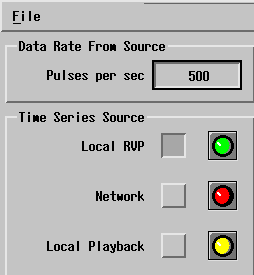
- Local RVP
-
Real time IQ from the IFDR. This setting is available only on an RVP.
Used for normal data processing, to archive local RVP10 real time IQ, or to export real time IQ over the network.
- Network
-
Used to collect time series from a networked RVP10 or from an archive host using the TS import process.
Can be used by an RVP10 for playback or by an archive host for recording.
- Local Playback
-
Used to extract time series from the local disk archive.
On an RVP, the time series can be processed. On a separate archive host, the time series can be sent to an RVP or a custom user application for processing.
| Color | Description |
|---|---|
| Green |
Source successfully selected. |
| Yellow |
Source is available, but not currently selected. |
| Red |
Source is unavailable. If you select the source, the status indicator remains red until it is enabled. In the case of a separate archive host, the Local RVP choice always shows red, because there is not a local RVP. |
-
As an operator, start the
tsswitchutility by typing:$tsswitch - Select the process.