

Ascope playback features
The Ascope utility is a stand-alone signal processor configuration and plotting utility. When RVP10 is in playback mode, you can use Ascope to configure the processing of the playback data and display the results. See IRIS and RDA Utilities Guide (M211316EN).
The following figure shows the differences in the meanings of menu fields when RVP10 is in playback mode.
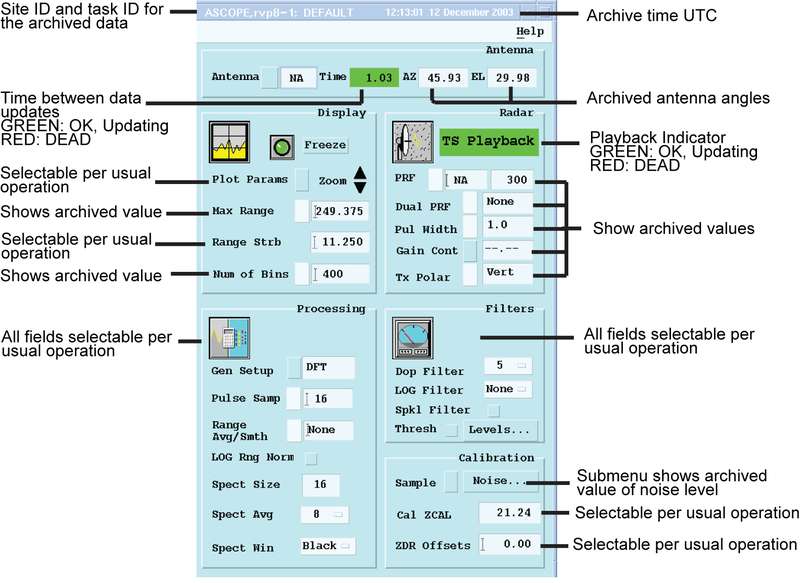
When RVP10 is in playback mode, instead of processing real-time data, the major difference is that some parameters were fixed at the time, when the data were recorded. Some examples of fixed parameters are:
- Maximum range
- PRF
- Transmit polarization
- Number of range bins
- Phase coding
- Value of noise level
These parameters relate to the transmit characteristics of the radar and for these, the archived value is displayed. You cannot alter the fields.
There are other parameter fields that can be changed, just like when you use Ascope with real-time data, such as the parameters to configure processing and plotting. For example, you can change processing major mode and clutter filtering parameters while RVP10 is in playback mode.
When using Ascope during RVP10 playback, the archive can be on the local RVP10 or on a separate archive host.
It does not matter where
Ascope runs. It can be on the local RVP10 or on a networked host
computer through DspExport.