

Associating Products with Tasks

Each product is associated with a task, which provides the ingest data for the product.
TASK Summary information, taken from the associated task, shows the key task configuration parameters.
When associating a task with a product, the system must consider matched resolution sampling and constructing volume scans for a product.
-
Select TASK Name to show a list of tasks.
Note that certain product types require different types of task associations.
Product Type Description Running a product from ingest data Enter a task name, including wildcard characters.
The question mark (?) matches a single character; the asterisk (*) matches any string of characters.
Volume scan product from hybrid tasks In the task name section:
-
Specify the input tasks with an underscore and single letter.
-
Specify the sub-task suffix letters in the Sub Task box.
Type a "*" to indicate all subtasks.
-
Type individual letters such as ABC, AB, BC, or AC to select which portions of the hybrid to include.
-
Type "–" to indicate a range of letters, for example "
A–DF" meansABCDandF.
RAW products Always made from a single task.
You must make a separate RAW product for each sub task.
If you are retrieving RAW data from tape or receiving a RAW product over the network, there is no task configuration file on your disk. In this case, type the task name directly in the field, exactly as it appears in the Ingest Summary menu or the Tape menu.
RHI products Include RHI in RHI task names to distinguish them from PPI scans.
-
-
To optimize product appearance and system performance, define the matched resolution
sample.
For best results, the range bin spacing and number of bins in the task should match what is needed for the product. This is called a matched resolution sample. The match does not need to be exact because IRIS uses interpolation algorithms.
For best performance, match the range bin spacing, number of bins and maximum range in the task configuration, to the desired pixel resolution, pixel scale and maximum product range in the product configuration.
For example, if you are making a low resolution product (240 × 240) to a range of 120 km (74.6 mi), and you want a single pixel to represent 1 km (0.6 mi) of data, configure the task configured with at least 120 range bins spaced 1000 m (3280 ft 10 in) apart.
Note that 170 bins can be displayed to the corners of the product. For a medium resolution product with 1 km (0.6 mi) bin spacing, the best match is for tasks with 240 to 340 bins spaced 1 km (0.6 mi) apart. Note that IRIS can make products for any range bin spacing that can be specified in the TASK Configuration menu, for example, 500 m (1640 ft 5 in) or 250 m (820 ft 3 in) spacings can be used as well.
-
If needed, construct a volume scan.
Some products require volume scan tasks, either PPI Full or PPI Sector scans taken at multiple elevation angles. Volume scan products include:
- BEAM
- CAPPI
- MAX
- TOPS
- VIL
- XSECT
- VVP
- WIND
For these products, multiple elevation angles are required in the associated task. There is a tradeoff between the number of elevation angles, the quality of the product and the task scan time. More elevation angles produce higher quality products at the expense of taking more time to complete the volume scan.
A typical volume scan is shown in the following figure. In this example, the height resolution is 1 km (0.6 mi) at 60 km (37.3 mi) range, for heights less than 10 km (6.2 mi). A 1° beam is 1 km (0.6 mi) wide at 60 km (37.3 mi), so this scheme matches the antenna resolution. If close range work is important, you must add higher elevation angles to cover the upper regions.
Figure 1. Example of 15-tilt Volume Scan 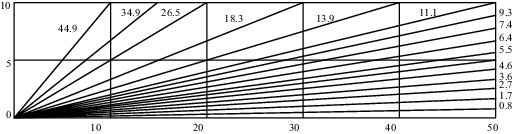
When constructing a volume scan task configuration, it is a good idea to do a drawing such as the one in the example, with a 1:1 vertical:horizontal scale so that you get a true picture of the sampling geometry.

The example is corrected for earth curvature, as are all IRIS products.
Also, because of beam widening effects, the accuracy of all products degrades with range. For example, the beam width at 120 km (74.6 mi) range is 2 km (1.2 mi) across for an antenna with a 1° beam. This is a fundamental limitation of radar sampling.