

TSC Monitor Menu
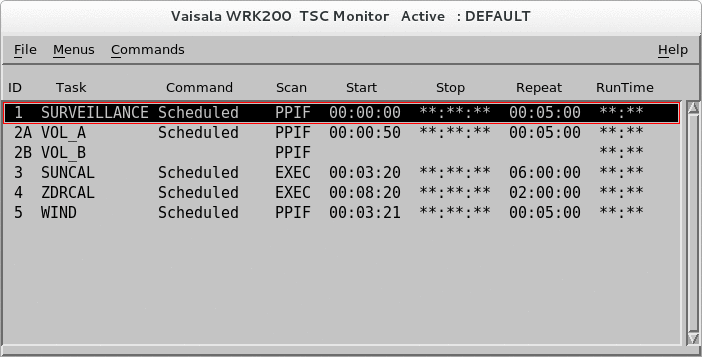
The TSC Monitor contains a list of the tasks that make up the schedule, with indications of the currently running mode and tools for starting and stopping tasks.
- Select .
-
To change to a different task schedule, select .
A list of previously configured task schedules appears. Select an item on the list to change the TSC mode to that configuration.
-
To start or stop tasks, place the cursor over the Command select
a command.
Task Start and Stop Commands Command Description Go (Schedule) Runs the task according to schedule.
Regularly scheduled tasks are typically used for routine IRIS operations. You can create, test, save and recall schedules for different modes of operation.
Go (ASAP) Runs the task immediately, depending on the priority of other tasks. Use this for interactive operation
STOP (When Done) Stops a task as soon as it finishes running.
STOP (Right Now) Stops a task immediately, even if the task is incomplete.
Interrupt/Reschedule Stops a task immediately and then reschedules it.
-
To check the status of a task, check the Command column.
Task Status Status Description Idle Task has not been activated by the Go command. Scheduled Task has been activated by the Go command, but it is not the task's turn to run. Running Task is currently running. ASAP Task is scheduled to run as soon as possible. This is the status after issuing a Go Now command For hybrid tasks, the B and C part show only the message Running when the task is running. Otherwise, this field is blank.
- To check how long the task took to run, see Run Time.