

Using Passive IRIS
The task scheduler supports running in either active or passive data acquisition modes. The Setup utility configuration (setup/ingest/scanning) determines whether your system functions as:
- Active only
No user configuration required.
- Passive only
No user configuration required.
You must load the task schedule with the tasks corresponding to the active system. All tasks must be set as Scheduled.
-
Active/passive (selectable)
You can select active or passive operation.
Most systems use active data acquisition where IRIS controls the antenna scanning. In some installations, an external system controls the antenna and IRIS, in passive mode, acquires the data by listening to what the radar is doing and synchronizing to the external control.
-
To check if your system uses active or passive data acquisition, select TSC
Monitor
The menu bar shows one of the following:
- Active
- Passive
- Active (selectable)
-
If you system is configured to select whether data acquisition is active or passive,
select choose either Active or
Passive.
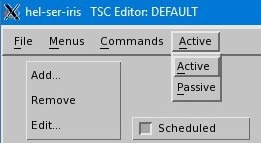
- If you change the data acquisition mode, select to take the changes into effect.