
Operation Forced to A—Auto Switching and B Disabled
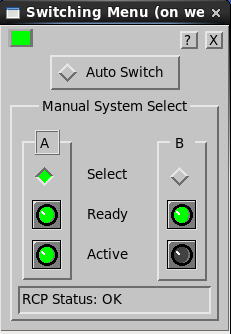
| Auto Switch Off | ||
|---|---|---|
| A | B | |
| Off | Select | Off |
| Green | Ready | Green |
| Green | Active | Off |
The A Select is green, indicating that it has been selected (by pushing the button in this menu) to be the exclusive system.
The A Ready and Active lights are both green. B is disabled by this action, similar to disabling B using the hardware switch. However, B’s Ready light is green so that it could be used.
Action
Restore the system to Auto Switch mode as soon as possible.
If the selection of A was made because of intermittent behavior of B, then isolate the problem.
It is recommended to set the hardware A/B switch to disable B during maintenance and then re‑enable Auto Switch . This way when maintenance on B is complete, the system is ready to switch automatically without operator intervention.