
RCP is Dead
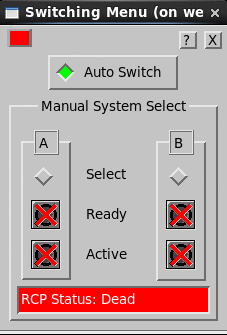
| Auto Switch Green | ||
|---|---|---|
| A | B | |
| Off | Select | Off |
| X | Ready | X |
| X | Active | X |
The 4 X’s indicate that the RCP (in this example, system B as indicated by the [B]) is not communicating to the IRIS workstation.
Problem
IRIS–to–RCPB link has failed, or RCP8B has been turned off.
Action
Check if RCP8 B has been turned off. Check IRIS–to–RCPB link cable. To see if RCP has been turned off:
- Check the front panel.
- Check the Radar Status Menu for system B (”RCP Dead” in Subsystem Status).