

COMP Scheduling
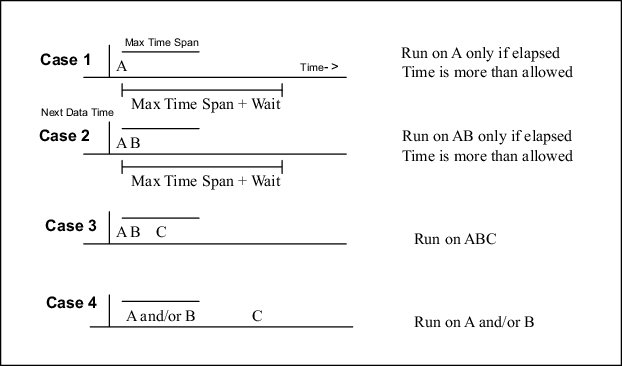
The scheduling algorithm takes into account that not all radars are on the same schedule and not all radars work 100 % of the time.
Consider a simple case of products arriving from radars A, B, and C shown in the previous figure.
- A, B, and C refer to products from different radar sites.
- The vertical line at the left represents the Product Scheduler "Next Data Time". The scheduling algorithm only considers data ahead (to the right) of this line.
- The upper bar represents the "max time span" for making a composite. The max time span is set in the COMP Product Configuration Menu. See Configuring COMP.
- The lower bar interval is the "elapsed time" between the time of arrival of a product and the current time.
- The products are positioned on the time line according to their "Data Time" (for example, start of a volume scan).
- Each site is ranked in priority for the purpose of assigning the "Data Time" of the composite. When the composite is made, it inherits the data time of the highest priority used site. The ranking is determined by the order of the site list in the COMP Product Configuration Menu.
Cases 1 and 2: Incomplete Data, Do Not Wait Forever
In these cases, the scheduler waits for the data to be completed until the time between the arrival time of the earliest product and the current time exceeds the time window plus the "Product arrival wait time" from Setup.
This provides tolerance for radar workstation clocks that are not exactly synchronized, or for variations in the network transfer time.
After running, the scheduler advances the "next data time" pointer to just after the data time of the latest product.
Note that only the radar computers must have their times synchronized. The system clock on the compositing computer is irrelevant.
Case 3: A, B, and C Are All Available and in the Time Window
Run on A, B, and C. This is the best case since all the data have arrived.
After running, the scheduler advances the "next data time" pointer to just after the data time of the latest product that just ran.
Case 4: Out of Sequence Data or Late Arrival
A and B both arrive and then C arrives out of the time window. Run on A and B only. After running, advance the next data time to just after the data time of the latest product that just ran.
A arrives then B or C arrive out of the time window. Run on A only. Advance the next data time to just after the data time of A.
Using Skip Times
The discussion above is for a schedule where the skip time is set to 0.
In this case, no data is ever reused, and the next data time is set to just after the last product used as inputs.
The only difference when using a skip time is that the next data time is set to the next multiple of the skip time after the first product that was composited. This guarantees that a composite is not skipped because of a single missing input file. It also means that in some cases the same input file may be used in 2 composites.
It is recommended that the Max Time Span be set to just under the skip time. Using a skip time is generally required if you are compositing radars with different times between volume scans.