

COMP: Composite
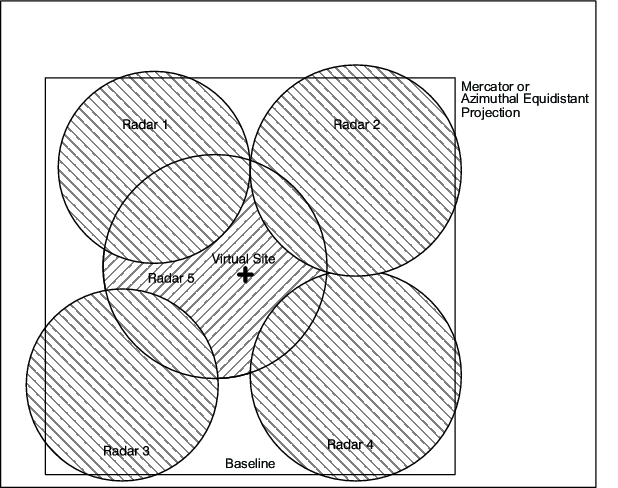
COMP produces a single composite image of radar data from many radar sites.
COMP allows you to combine data from many different radars.
The advantages of compositing are:
- Expand the area of coverage to give forecasters the big picture.
- Fill-in blind spots caused by mountains or required sector blanking.
- Fill-in blind spots caused by scan strategy limitations (for example, not scanning to high elevation angles).
- Simplify product management so users do not need to check multiple single-radar images.
Types of Products for Compositing
Unlike other products, when you schedule a COMP product, IRIS does not make a product of type COMP. Instead, it makes a composite of the input product and saves it as the input product type.
For example, if a PPI is the input to the COMP product, then the output is a PPI product.
The types of products that can be combined by COMP are:
- BASE
- CAPPI, including
3D CAPPI (
dBZandR) - HMAX
- MAX (side panels are removed)
- PPI
(
dBZandR) - RAIN1
- SHEAR
- SRI
- THICK
- TOPS
- USER
- VIL
- WARN
Use of Composites by Other Products
COMP produces real IRIS products instead of just "pasting" the images together to make a combined picture.
This means that other IRIS products, which use products as input, can be run on the composites. For example, a composite CAPPI can be used as input to a RAIN1 accumulation product. A composite 3D CAPPI can be used as input into the optional IRIS 3D package. Products such as WARN, TRACK, and FCAST can run on IRIS products that are composites.
Automatic Remapping of Input Products
Compositing of products can be complicated because of issues of different radar resolutions, maximum range, angle spacing, number of pixels, map projections, and similar.
IRIS makes it easy by automatically remapping the input products to the final output projection and resolution. This means that you can input products that have different pixel resolution, center position and maximum range, even in different projections (Mercator versus azimuthal equidistant), and IRIS does the remapping to make the final product.
This means that when you make composites, you can use normal single-radar projections. There is no need to make a special set of products to serve as input to the composites. This simplifies system configuration management.
Sources for Input Products
From the the host computer, select where input products are made and who makes them (IRIS against non-IRIS). The products used by COMP can be:
- Generated locally on the same workstation where the composites are made.
- Sent over the network from another workstation (IRIS or non-IRIS using UPI).
- Any combination of the above.
Input of Products from Non-IRIS Systems
The ability to send products over the network to a central compositing computer, plus the ability to automatically remap data, makes it easy to combine data from non-IRIS systems.
The remapping feature is important since you may not have control over the range or resolution of the non-IRIS data. Products from non-IRIS systems can be reformatted to match the standard IRIS formats and then inserted into IRIS using the Input pipes mechanism.
Vaisala supplies source code examples to customers who want to reformat non-IRIS data and insert it into IRIS. These products can then be sent to the composite IRIS workstation either directly, from an external user program, or through another IRIS.
Composites of Composites (Regional, National/International Composites)
The maximum number of radars that can be used in a composite is 16. This is adequate for most applications.
For larger networks, it is recommended to first make regional composites, and then composite the composites to make national or international composites.