

Configuring CATCH Products
- Select .
-
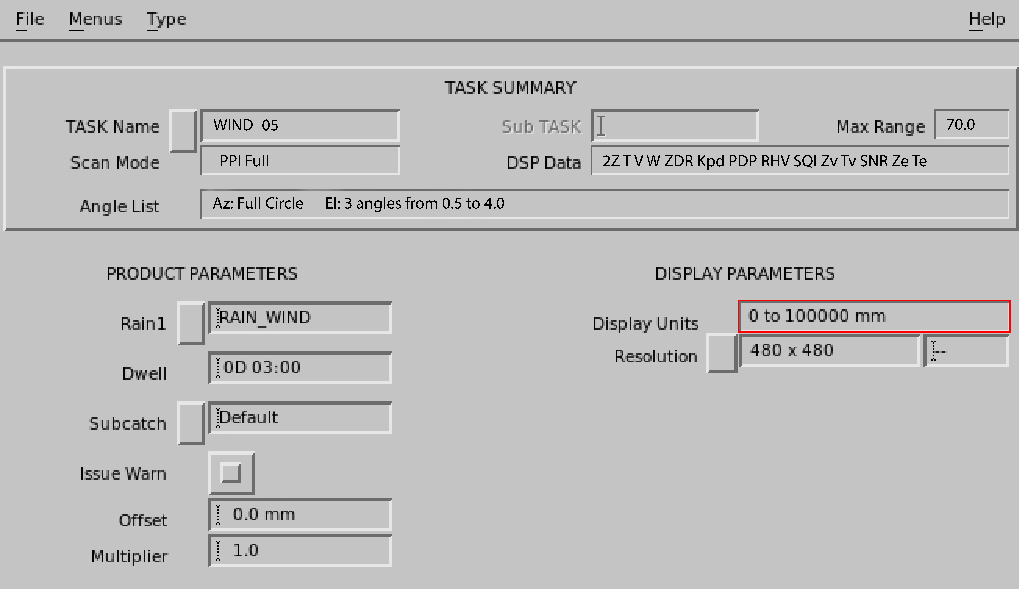
Configure the CATCH product:
- Rain1
-
Specify the product name of the input hourly RAIN1 product.
Select Rain1 and choose from a list of products, or type the name in the field.
When you enter a product name, the associated task information is displayed in the TASK Summary.
- Hours
-
Specify the number of hours to integrate. When the product runs, it integrates data for the last
Nhours.If a RAIN1 product is missing for one of the hours in the interval, the algorithm assumes that no rain fell during that hour.
The product output shows how many hours were integrated.
- Color Scale, Levels, and 1st Level/Step
-
Specify the color levels can be specified.
The resolution is fixed by the resolution of the RAIN1 configuration.
- Subcatch
-
Select the subcatchment file name. The subcatchment file contains the subcatchment definitions.
- Issue Warn
-
The CATCH product can generate warnings if the amount of precipitation for a subcatchment exceeds a threshold value.
The threshold value for each subcatchment area is configured in the subcatchment file.
- Offset and Multiplier
-
Use these values to modify the thresholdsfor each subcatchment. This might be done to account for different integration times.
For no adjustment of the thresholds in the subcatchment file set
Offset=0.0andMultiplier=1.0.Vaisala recommends that you configure the thresholds in the subcatchment file to be characteristic of accumulation over a standard time such as one hour. You can then use The offset and multiplier can then use Offset and Multiplier to adjust all of the thresholds.
For example, assume that an indicator of flood hazard in a subcatchment experience shows that the one hour threshold is 10 mm (0.39 in) and the 2 hour threshold is 15 mm (0.59 in) for flood hazard. You can configure the 10 mm (0.39 in) value for the subcatchment and then set the multiplier to 1.5 and the offset to 0.0. This allows some degree of adjustment of the subcatchment thresholds for different time periods.
Another technique is to configure different subcatchment files with the thresholds set for different integration times. In this case the name of the subcatchment file should reflect the integration time such as CATCH_06 to indicate that the thresholds are set for 6 hours.
-
In Save As, name your CATCH
product.
Vaisala recommends naming your CATCH product by the number of hours of integration and a general descriptor of the area, perhaps even the name of the subcatchment file.
For example, if the subcatchment file for a large river watershed is called RED_RIV and the integration time is 2 hours, save the product under the name RED_RIV_02.