Configuring IRIS Product Outputs for TDWR
The IRIS product output configuration for the TDWR consists of:
- Output of TDWR products to the SD's (IRIS/Display Workstations with hardware and/or virtual ribbon displays).
- Output of SHEAR and SLINE products to the TDWR/LLWAS Integrator.
Both output configurations are made on the
system where the TDWR/IRIS Integrator is running. This is typically an IRIS/Analysis
Workstation functioning as an RPG (radar product generator). In the examples below, this
node is called cyclone.
-
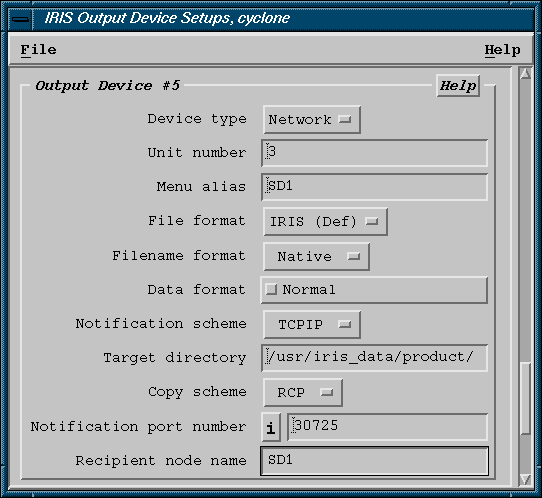
Configure output to the SD's:
- Configure the IRIS Product Output Menu to make automatic output of TDWR products to the SD's.
-
Configure output to the TDWR/LLWAS Integrator:
-
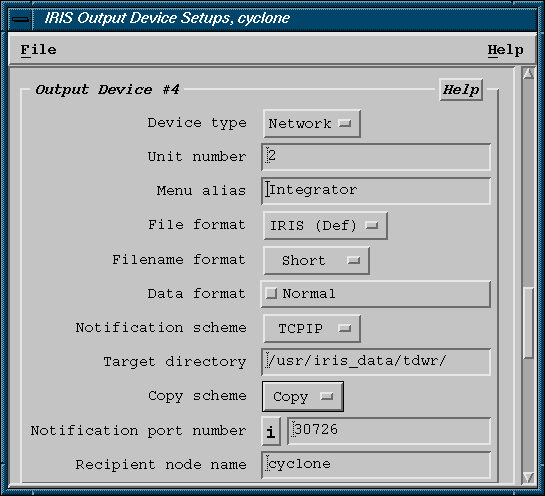
Use IRIS setup/output to configure the output to the Integrator.
See the following example. Use the Short file name format.
Since the Integrator runs on the same machine, use Copy rather than RCP (remote copy).
The notification port must match that configured for the Integrator in the runways.conf file (See Configuring Integrator and Runways Utility - runways.conf). The recommended port is 30726 as shown in the example.
-
Use IRIS setup/output to configure the output to the Integrator.