

Antenna and Transmitter Status
The pane shows the status for the antenna, transmitter and BITE systems, including antenna position and velocity.
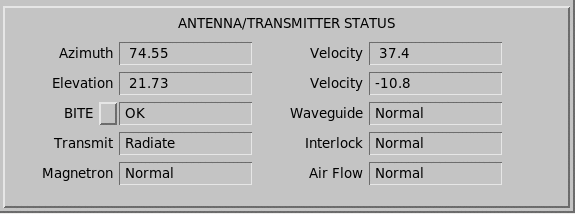
Azimuth and Elevation Position and Velocity
The azimuth and elevation values show the antenna position and velocity (in RPM).
For the velocity, clockwise and upward motion are positive values, while counterclockwise and downward motion are negative values.
Transmit
| Status | Description |
|---|---|
| Off | The transmitter is off. |
| Not Ready | The transmitter is warming up. |
| Standby | The transmitter is ready to transmit, but has not been set to radiate using the Radiate button. |
| Radiate | The transmitter is radiating. |
Safety Parameters
The safety parameters display the status of safety and monitoring parameters reported by the built-in test equipment. The report contents depend on the installation.
| Safety Parameter | Description |
|---|---|
| Air Flow | Shows whether the cooling air flow in the transmitter is Normal or Fault. |
| Interlock | Shows the status of the safety interlock circuit. For example on a high voltage cabinet door, the status is either Normal (door closed) or Fault (door open). |
| Magnetron | Shows the magnetron current as Normal or Fault. |
| Waveguide | Shows the waveguide pressure as Normal or Fault. |
| BITE | Shows OK or Fault for the optional BITE unit. |
For information on faults, see the Bitex section in IRIS and RDA Utilities Guide (M211316EN).
Fault Alarms Sent to IRISnet
The red or yellow fault indicator in IRISnet shows the state of the Radar Status Menu on a host.
A red field in Radar Status menu causes a cross indicator to the IRISnet icon. The cross is red for critical alarms, and yellow for non-critical alarms.
 |
The Site Status field of Radar Status Menu is not indicated in IRISnet. Since Site Status shows other sites, it would be confusing if a fault in Site A causes an IRISnet Red X on site B just because site B was receiving status products from A. If a local fault causes the site status to go red, that fault is indicated elsewhere in the Radar Status Menu. |
You can set some faults to be critical or non-critical. For example:
- Radar, Product Generator, or Output Processes turned–off (buttons at the top). These are always critical.
- DSP or RCP communication error (sub-system status fields). These are always critical.
- Antenna/Transmitter Status: BITE (configurable in BITEX to be null, critical or non–critical)
- Antenna/Transmitter Status: Air Flow, Waveguide, Interlock, Magnetron (configurable in setup/rcp to be critical or non–critical).