

Control Section
The pane includes tools for:
- Viewing active IRIS mode
- Loading and saving IRIS configurations
- Starting and stopping the major IRIS processes
- Starting and stopping the radar transmitter
- Device resets for selected equipment
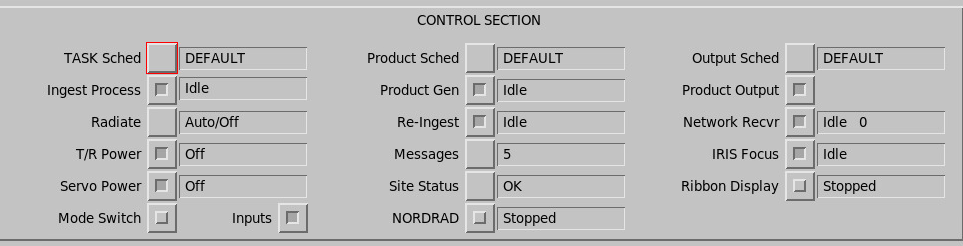
 | CAUTION Set the DEFAULT IRIS configuration so Radiate and Servo Power are off if there is a possible hazard to personnel when IRIS starts. |
TASK Schedule
Determines which task schedule is run. Select the button to show a list of available task schedules.
Ingest Process
Provides control and status for the software that runs the radar system and creates ingest files. Toggle this button to start or stop radar operation.
 |
In the Setup utility, you can define whether RCP or signal processing (DSP) is reset when ingest process starts up. By default resetting both is enabled.
|
The text area to the right of the toggle button shows the ingest process status.
| Status | Description |
|---|---|
| Running | The current task is running normally. |
| Idle | No task is running, but the radar process is ready to run tasks. Either tasks have not been scheduled, or it is not time for a scheduled task to run. |
| Stopped | The ingest process is off. |
Radiate
Controls the transmitter radiate with the following options:
- Auto — For normal operation. IRIS turns the transmitter radiate on and off automatically. For example, if there is no task to be run for five minutes or more, IRIS temporarily turns the radiation off.
- On — The transmitter radiate is on at all times during IRIS operation. This is the recommended setting for magnetron radars.
- Off — The transmitter radiate is off at all times during IRIS operation. A warning message is generated if you run a task with Radiate turned off.
Transmitter radiate status is reported as either On or Off. See Antenna and Transmitter Status.
Transmitter (T/R) Power
Controls power to the transmitter cabinet. The status is either On or Off. When power is turned off, the sensors for some of the Antenna/Transmitter status items do not function properly.
Servo Power
Turns the antenna servo drive power on and off. The status is either On or Off.
Product Schedule
Determines which products are generated.
Select the button to show a list of available product schedules. In most cases,
DEFAULT is the only product schedule.
Product Generator
Toggles Product Generator process on and off. The status is shown as Idle, On, or Off.
Reingest
The reingest process takes a RAW product file and makes ingest files, which can be processed to make products. The reingest process can be activated either:
- Automatically, whenever a RAW product is restored from tape.
- Automatically, whenever a RAW product is received over the network.
The reingest process can be toggled on or off. The status is displayed as Idle, Running, or Stopped.
NORDRAD
If your system is licensed to receive product output from the Nordic Radar Network System (NORDRAD), you can turn NORDRAD on and off.
The field shows the status of the receive process as Idle, Running, or Stopped.
Messages
Select to open the Message Summary menu.
The Message field shows the number of messages after IRIS startup.
Site Status
Gets information from Status products that are either received over the network or made locally.
These are made automatically at each radar site on a fixed schedule (for example, every 10 minutes) as set in the setup/product utility. See IRIS and RDA Utilities Guide (M211316EN).
The Status product can then be sent automatically over the network through the Product Output Menu. For example in a radar network, each radar may send routine status products to a central maintenance facility.
Select the button next to the field to show a list of all sites and their status.
Output Schedule
Indicates the mode of the product output menu. Select the button to show a list of available output modes.
For example, you may have 2 parallel network connections to the radar site (main and backup
network) and in DEFAULT mode products are sent through the main network,
while in BACKUP mode they are sent through the backup network.
Product Output
Controls whether products can be output to display devices or tape. This is a convenient way of stopping all output to all users if a problem develops.
Network Receiver
If your system is configured to receive product output from another IRIS host or workstation, this field shows the status of the receive process, as Idle, Running, or Stopped.The field also displays the number of IRIS systems to which you are connected. If the number is 0, you are not currently connected. The other computer may not be running IRIS or the connection may be broken. You can toggle this field on and off to attempt to reestablish a broken connection. Check with your system manager if you are uncertain.
IRIS Focus
If your system is running IRIS Focus server, you must enable the IRIS Focus option.
When enabled, this field shows the status of the server process, as Idle, Running, or Stopped.
Mode Switch
Select this button to enable automatic reconfiguration. That is, IRIS automatically changes the configuration in response to a warning product.
Use the Automatic Mode Switch menu to define the warning products to check and the configurations to load in the event of a warning.
Inputs
IRIS input process can be polling directories looking for arriving files. This is configured from the Input section on setup. The inputs switch turns the inputs on/off.