

Subsystem Status
The pane displays the status of the subsystem devices connected to IRIS. The contents vary depending upon the system set-up.
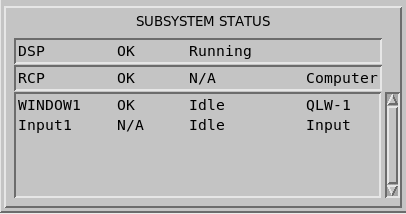
Use the setup utility to configure the devices listed under Subsystem Status.
Depending on the device, the status is obtained from self-tests invoked when the radar process starts and from watchdog process that monitor the device during normal operations.
Status information displayed with the status message NA (not available) indicate that a device has not been installed.
| Device Type1 | Device Status | Running Status | Additional Information |
|---|---|---|---|
|
RCP (Radar Control Processor) |
OK Fault (yellow background) Error (red background) |
N/A |
If the status is OK, indicates if RCP is controlled by:
If RCP overall status is Fault or Error:
|
|
DSP (Doppler Signal Processor) |
Idle - DSP is OK but inactive Running Stopped N/A |
<empty> | |
|
Windowx (Quick Look Window) |
OK N/A - Device is configured in Setup but is not initiated. NoIRIS - Used for TDWR output. |
Idle - device is OK but inactive Init - device is initializing Running |
The alias name of the device as configured in the Setup utility Output section. |
|
Networkx Node Name (Network Output) |
|||
| Archivex | |||
| Printerx |