

Applying the DWELL Algorithm to Product Scheduling
The basic DWELL algorithm (without target warning) takes a series of products from the same site, of a given name and type and merges them together.
Product Scheduling
You schedule the DWELL algorithm in the Product Scheduler.
When the Product Scheduler detects an input product beyond the
Next Data Time, this product and all products from the same site, within
the specified dwell time (for example, the last 10 minutes), are combined to make a new
product of the same type. The data stored in the product can be either the data values of
the original product or the age of each point relative to the most recent product in the
series.
 |
If the DWELL product is based on a PPI product where the elevation selection in the PPI product configuration is set to the wild card *, then you must take care in scheduling to avoid excess CPU loading and performance degradation. To prevent the DWELL product being produced on the completion of every PPI sweep,Vaisala recommends that you set the to the time required to complete a volume scan or longer. |
Input Product Filters
You can apply the following input data filters to each input product before it is merged into the DWELL:
-
Min Filter
Discards any pixel in the input product with data value less than the specified minimum value. For velocity, absolute value is used.
For the example of a PPI in dBZ, if the minimum value is set to 10 dBZ, all pixels with values less than this are discarded.
-
Max Filter
Discards any pixel in the input product with a data value greater than the specified maximum value. For velocity, absolute value is used.
For the example of a PPI in of dBZ, if the maximum value is set to 50 dBZ, all pixels in the input product with values greater than this are discarded.
-
Contrast Filter
Discards any pixel in the input product with data value not exceeding the corresponding data value in the computed background field plus a selectable threshold. For velocity, the absolute value of the difference between the background field and input product pixel is used. The background field is obtained by first creating a smoothed version of the DWELL product.
For the example of a VIL product, if the contrast threshold is set to 3 (mm) (0.12 in), then a pixel in an input product must have a VIL 3 mm (0.12 in) greater than the corresponding pixel in the background field.
If a pixel fails any of these tests, then it is set to thresholded, that is, no data.
Data Merge
After filtering, each pixel in the input is "merged" into the corresponding pixel in the DWELL output. If, for example, there are 10 input products to merge, there can be up to 10 possible values for assigning the output value. The merge algorithm uses the maximum value. In the case of velocity, the absolute value is used.
Depending on the user selection, the algorithm then stores either the time of the merged pixel or its data value. Time is stored as the "age" of the pixel relative to the most recent input product in the DWELL sequence.
In the case of merging WARN products, the centroid statistics are merged together, that is, a new WARN product is created that combines all of the centroids in the time sequence of input WARN products.
Background Field
The contrast filter allows relatively strong echoes such as reflectivity cores, birds or aircraft to be isolated from relatively weak background echo. For the target warning algorithm, the contrast filter is essential to detecting airborne targets in weak clear air or weather echoes.
The background field is created by first running the DWELL algorithm without the contrast step and then smoothing the data with a 2D filter. Note that the Max and Min filters are used to filter the inputs to generate the background field.
If the input product is PPIs at different elevation angles, you can generate the background field separately for each PPI elevation angle instead of merging the PPIs regardless of angle.
The merge algorithm for the creation of the background field is the same as for the main DWELL algorithm (that is, maximum value), except that for velocity, the average value of the signed velocity is used. The reason for using the Max for everything except velocity is that weather echoes have a natural power fluctuation and these are better removed by the contrast filter if the background field is based on maximum, that is, the background field has larger values so that fewer weather speckles are passed. In the case of velocity the average value is used to characterize the background field since it does not make sense to use the maximum when every velocity is equally likely.
After the merge, a smoothing filter is applied. This is a 2D averaging filter set to 10 by 10 km (6.2 by 6.2 mi) or 60 × 60 pixels (whichever is less), centered at the smoother output pixel. A triangular weighting is used to assign more weight to the center pixels. The filter requires a selectable percentage coverage to produce an average value at the center pixel, else a value of "thresholded" is assigned to the center pixel. The threshold is typically set to 20 % coverage. This has the effect that isolated point targets such as birds or aircraft are excluded from the background field so that they are not filtered by the contrast filter.
An example of a smoothed contrast filed is shown below for the same case in the examples in Composite Algorithm.
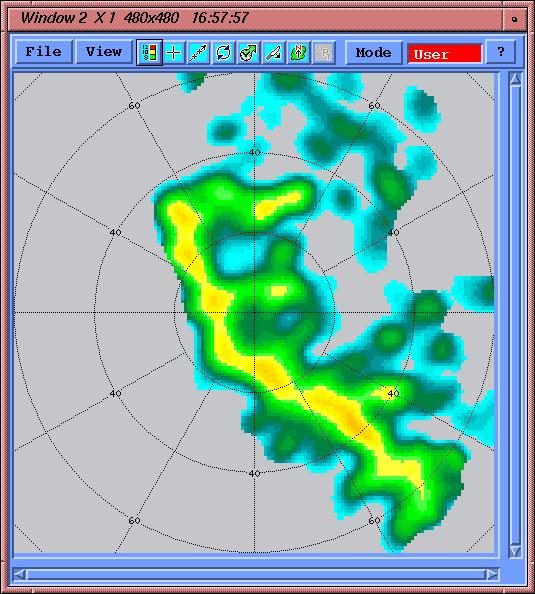
The smoothed background field has generally lower echo intensity as a result of the smoothing process. Note that there are no "speckles", that is, only large scale echo features remain. Thus the background field is a representation of the average background echoes. When this is subtracted from the input products and thresholded (in applying the contrast filter), the background echoes are removed, leaving only the high intensity cores or point targets such as birds or aircraft.
Diagnostic Output for Algorithm Verification
To assist with tuning the DWELL algorithm, especially in the case of target warning, the DWELL algorithm can produce diagnostic output.
To activate this output, select Diagnostic at the bottom of the DWELL Configuration Menu. Note that diagnostic output is produced even if you later disable the target warning, as long as the diagnostic button is enabled.
The diagnostic outputs are stored as type
USER products. The naming convention is as follows:
-
USER: < productname >DAT
              or TIM
The main output of the DWELL product is a product of the same type as the input product (for example, a PPI) for either the input product data type (for example, dBZ) or time (age).
The diagnostic
USERproduct is for the data type that was not selected for the main output.For example, if
dBZis selected for the main output, the diagnosticUSERproduct is for the time (TIMsuffix). If time is selected for the main output, the diagnosticUSERproduct is for the input data type (DATsuffix). -
USER: < productname
              >CON
If the contrast filter is enabled, the diagnostic
USERproduct with the suffixCONshows the background field. For an example, see DWELL Algorithm Examples. -
USER: < productname
              >PIL
If target warning is enabled, the diagnostic
USERproduct with the suffixPILshows the "pile" product, that is, the number of target hits per pixel (X4) for the first in the sequence of the assumed motion vectors (that is, the first trial).For diagnostic work, the target Warning can be configured to run a single motion vector so that any speed and direction can be isolated for study.