

Setting-up Real Time Display (RTD)
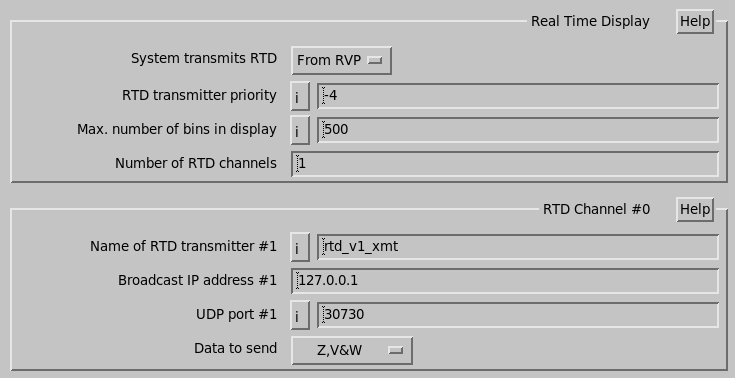
- System Transmits RTD
-
This option enables or disables the transmission of the RTD and shows or hides the RTD setup options.
When enabled you can specify up to 16 separately configured transmitter channels.
Choices are:
-
No
RTD transmission is disabled.
-
From App
An application program such as IRIS Ingest issues RTQ library calls to supply the data stream.
-
From RVP
RVP provides the data. In this case, the host application requires no modification to support RVP generating a display.
A single computer cannot generate from both sources.
If you are using dspexport, then both the host computer and RVP can generate data.
-
- RTD transmitter priority
- Maximum number of bins in display
-
This parameter limits the bandwidth of data transmitted over the network for the real time display.
It is used only in
rtd_v1_xmt.The display is usually acceptable with only a few hundred range bins of data. The maximum size of a ray that can be transmitted over the network is approximately 1500 bytes. Each data type takes up 1 byte. If there are more range bins in a task than can be sent, IRIS sends only 1 out of every
Nbins, whereNis the smallest number possible. - Number of RTD channels
- Shows the number of RTD channels. You must increase this number each time you add a new RTD channel to the configuration.
RTD Channel Parameters
Each RTD channel has its own set of configuration parameters:
- Name of RTD transmitter #1
-
Specify the name of the executable program which is run to transmit the real time display stream for this channel.
Vaisala recommends the default transmitter rtd_v1_xmt.
Vaisala also ships 2 other transmitter programs: rtd_v2_xmt and rtd_nids3_xmt.
You can also customize the format by writing your own program and entering it here. The API and the existing transmitter programs are public.
- Broadcast IP address #1
-
Specify the broadcast addresses here.
Generally only one is used, and it is your network address with the machine number set to 255.
You can use the local loopback address 127.0.0.1 to display only locally. To find your address, type netstat -nr to list your interfaces.
For example, if your interface is called
eth0, type ifconfig eth0 to show your broadcast address. If it is not there, you may need to turn on the broadcast feature. - UDP port #1
- Specify your port number here. Any unused port number can be used, but Vaisala suggests using 30730 as a default.
- Data to send
-
Select Z,V,&W for minimal data types, Single Pol for all single polarization data, or Dual Pol for all data types.
This control also only applies to the rtd_v1_xmt format.
Note that there is an internal limit of 10 data types.