

System Parameters
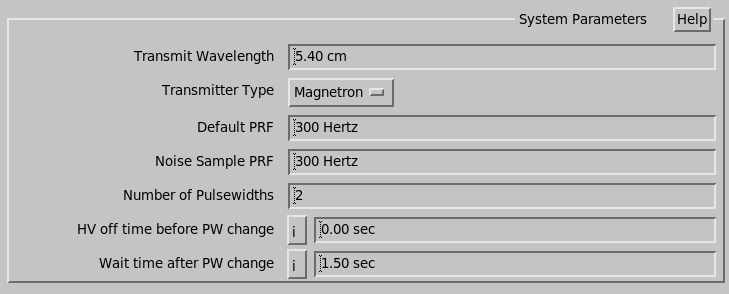
- Transmit Wavelength
- Enter the wavelength in centimeters.
- Transmitter Type
- Choose the transmitter type of the radar (for example, Magnetron or SSPA). This example illustrates that the phase control option displayed if a magnetron transmitter is used.
- Default PRF
- Enter the PRF to be used by the utilities if the PRF is otherwise unspecified. Set it below the maximum PRF for the longest pulse width to preserve the transmitter duty cycle regardless of the pulse width setting.
- Noise Sample PRF
- Enter the PRF in Hz for noise sampling (see RVP10 User Guide (M212604EN)). Typically, a value of 200 Hz is adequate.
- Number of Pulsewidths
- Enter a number 1 ... 4 for the number of pulse widths that are supported.
- HV off time before PW change and Wait time after PW change
-
Controls behavior if the pulse width and PRF values change by defining the following conditions:
- How long to wait after changing the PW before changing the PRF.
- How long to wait after changing the PRF before changing the PW.
- How long to wait after changing the PW before we are sure we can detect the new PW state.
- How long to wait after changing the PW before we turn on the HV, if it was turned off.
See the following examples.

These delays protect magnetron radar transmitters, which take some time to change their pulse forming networks, and protect systems using the RCP to control the pulse width. When the RCP controls the pulse width, there may be a small variable delay before the command takes effect.
For example, for magnetron transmitters, the suggested values are 0 for the HV off time before PW change, and 0.5 seconds for the Wait time after PW change.
When IRIS changes the PRF only, and not the Pulse Width:
It freely changes the PRF without any delays.
When IRIS changes the Pulse Width only, and not the PRF:
- Turn off the High Voltage (only if it was on, and the HV off time before PW change is nonzero).
- Wait the time specified in HV off time before PW change.
- Set the pulse width to the new value.
- Waits the time specified in Wait time after PW change.
- If possible, checks that the pulse width actually changed.
- Turn High Voltage back on (only if turned off in step 1).
When IRIS changes the Pulse Width and the PRF, and the new PRF is higher than the old PRF:
- Turn off the High Voltage (only if it was on, and the HV off time before PW change is nonzero).
- Wait the time specified in HV off time before PW change.
- Set the pulse width to the new value.
- Wait the time specified in Wait time after PW change.
- If possible, checks that the pulse width actually changed.
- Sets the PRF to the new value.
- Wait the time specified in Wait time after PRF change.
- Turn High Voltage back on (only if turned off in step 1).
When IRIS changes the Pulse Width and the PRF, and the new PRF is lower than the old PRF:
- Turn off the High Voltage (only if it was on, and the HV off time before PW change is nonzero).
- Wait the time specified in HV off time before PW change.
- Set the PRF to the new value.
- Wait the time specified in Wait time after PW change.
- Sets the pulse width to the new value.
- Wait the time specified in Wait time after PRF change.
- If possible, checks that the pulse width actually changed.
- Turn High Voltage back on (only if turned off in step 1).