

Configuring SWS Input
SWS data arrives on an IRIS system through a file transfer and ingest mechanism.
You must configure a source of METAR and/or SYNOP messages to transfer ASCII files to a known directory on the IRIS Analysis system. IRIS monitors this directory for new files, then runs an input pipe to convert this data to IRIS's internal SWS format and insert into the IRIS product directory.
You must configure the SWS input.
-
Make sure you use a recent version of the
metar2irispipe by copying the binary and config files from irisrda_templates directory to pipes directory.This pipe parses metar and synop messages.
$ cd /etc/vaisala/irisrda_templates $ cp pipes/metar2iris usr/bin/pipes| $ cp metar* /etc/vaisala/irisrda -
Configure and save a new input device in . For example:
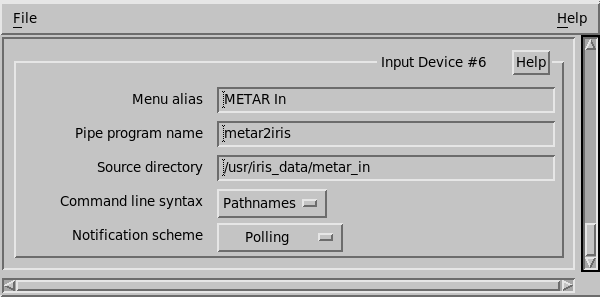
-
Edit the following configuration files:
File Name Description metar_site.conf Configures the METAR or SYNOP station site list consisting of ICAO site ID, (optional WMO site ID), LAT/LON, altitude, description, and priority.
Since the METAR/SYNOP texts do not include the latitude and longitude of the stations, this file is essential.
When a METAR or SYNOP file arrives, all stations in this file are expected.
-
Any station listed in the file, but missing from the report, are marked as
DNR(Did Not Report). -
Any station in the report, but missing from the file is deleted, and a message is placed in the pipe log file.
You must maintain the files to remove old stations, and add new ones.
For a rough list of METAR and SYNOP stations, see: http://weather.rap.ucar.edu/surface/stations.txt
synop_site.conf fmetar2Iris.conf Configures the product's geographical bounding box. This is the size of the box when the SWS product is displayed alone.
Any station outside this box is discarded.
We also configure the SWS product name, and IRIS site name, and similar.
The template files are configured for Turkey.
-
-
Create the input directory. These directories must be owned by operator.
$ su # mkdir /usr/iris_data/metar_in # chown operator:users /usr/iris_data/metar_in - Restart IRIS.