

Dale Ribbon Display General Use
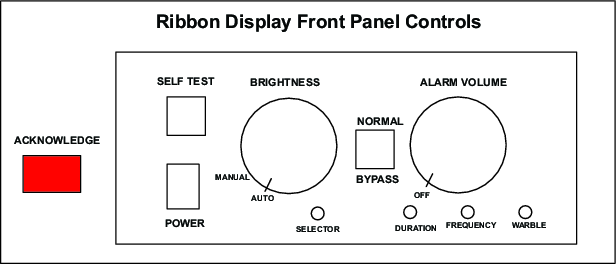
The hinged front panel drops down to access the local controls. The controls area is illuminated when the door is open.
- Self Test
-
Hold in the SELF TEST push button to write the character set to the display. The monitor's ID number, model number, and software version are shown on the last line of the self test screen.
If required, you can use the selector switch can be adjusted to change the ID number.
The audio alarm is activated and you can adjust the volume and warble.
If data is sent to the monitor while SELF TEST is depressed, the monitor sets
D6andD7(of the status byte) high when the button is released to indicate that data sent to the unit was not captured and that the screen should be regenerated. - Brightness
-
Use the BRIGHTNESS control to adjust the display brightness.
To increase brightness rotate the control clockwise.
When the control is rotated to its extreme counter-clockwise position (past a switch detent) the brightness is controlled automatically according to the amount of ambient light in the room.
- Normal/Bypass
-
Put the switch in the NORMAL position to enable communication between the monitor, host, and other peripherals.
Put the switch in the BYPASS position to route the RS-232D signals are routed around the monitor.
This hardware switch isolates the monitor's I/0 circuitry when in the BYPASS position.
- Selector
-
You can set the monitor's identification number can be set from 0 ... 7 through the recessed switch.
To set the identification number, push and hold the SELF TEST button, and adjust the SELECTOR control until the desired number is displayed on the screen. Note: There are three positions that display 0. All work as ID
#0. - Alarm Controls and Adjustments
-
The audible alarm is 2 tones that are alternately turn on and off to create a "warble" effect.
You can adjust the parameters of the warble using the DURATION, FREQUENCY, and WARBLE adjustments.
- Volume
-
Use the VOLUME control to adjust the audible alarm loudness between 60 ... 85 dBa.
Turn the control fully counter-clockwise to disable the alarm speaker output. Loudness is increased with clockwise rotation and decreased with counter clockwise rotation.
- Duration
- Varies the on/off time (duty cycle) of the two tones.
- Frequency
- Raises or lowers the frequency of the 2 warble tones.
- Warble
- Varies the rate at which the 2 tones are alternated.
- Acknowledge
-
When the host computer sends an alarm, the monitor activates the audible alarm and illuminates the ACKNOWLEDGE push-switch.
Push the ACKNOWLEDGE switch to acknowledge and silence the alarm.