

IRIS Virtual Ribbon Display
For systems that do not have the Dale model
ribbon display, the IRIS Virtual Ribbon Display (vribbon) is provided.
It is also convenient for "eaves dropping" on Dale displays to verify that they are properly configured, that is, you can look at a virtual version of the Dale display.
Observers, Operators, and Controllers can
access the vribbon. The vribbon display is run locally on an SD by opening a
terminal and typing:
$ vribbonvribbon Display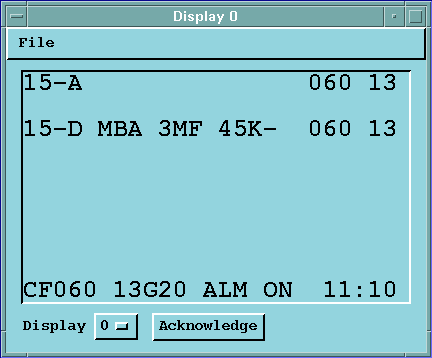
The display has 10 lines. The top nine lines
are used to display warnings for various approach and departure corridors. In the example,
runway 15 departure has a microburst alert with a 45 knot loss. The threshold winds are
reported as 60° (060) at 13 knots. The bottom line shows the center field
wind data and the status of the alarm signal.
The vribbon can show any of
the 8 physical ribbon displays. This is done by selecting the display number (0 ... 7). The
vribbon display also has a tone alarm that can be silenced (not disabled)
by selecting Acknowledge.