

Advanced Interface Features
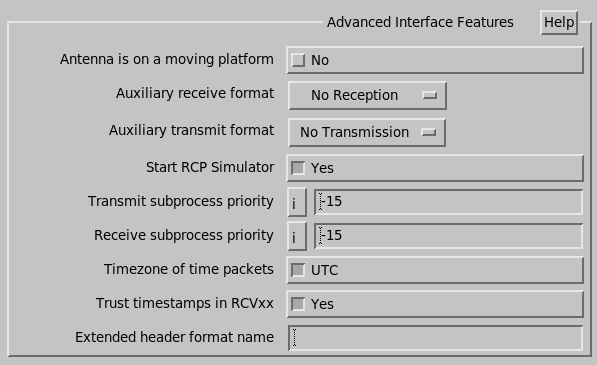
- Antenna is on a moving platform
- Use this to enable the INU related setup questions, and platform motion correction in the real-time display.
- INU info insertion source
- This tells which INU source we are using. Normally we use RCP8. If we are getting INU information from a custom extended header library, then enter Custom Header. Only visible on moving platform systems.
- Auxiliary receive/transmit format
-
Some systems have 2 serial lines each for transmitting and receiving RCP control information.
Only the primary line is used to receive information. If your system uses 2 lines, configure the second line as the auxiliary.
- Auxiliary serial device name
-
Available when a Auxiliary receive format is set to something other than No reception/transmission.
Enter the auxiliary serial device file when used.
- Start RCP Simulator
- Used for simulated systems to automatically start up the antenna simulator when the antenna driver starts.
- Receive/Transmit Subprocess Priority
- On UNIX systems, set the priority to -15.
- Timezone of time packets
-
Some RCPs are configured to send the current time to IRIS over the serial link.
Use this value to set the time of the radar computer at the safest times. This specifies the timezone of that data stream.
- Trust timestamps in RCVxx
-
Some RCP serial formats include a timestamp used to accurately time sequence the received data.
Set this to No on systems attached to RCPs that do not fill in those numbers.
- Extended header format name
-
Set this to blank for systems with no custom extended header.
If you have custom extended headers, enter the name of the extended header shared library.