

Status Bit Definitions
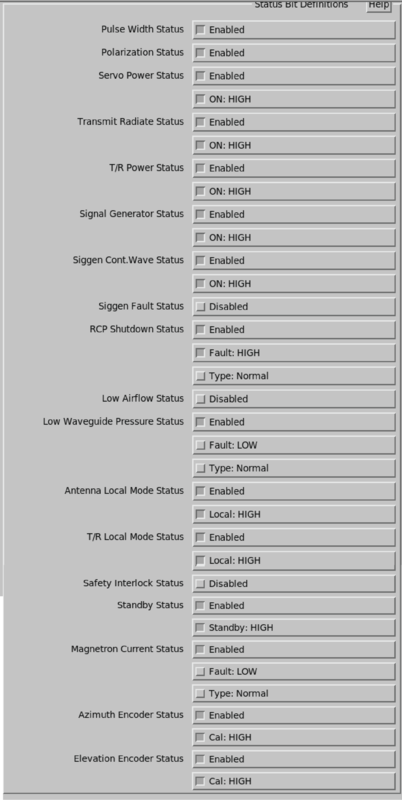
- Pulse Width Status
- Select Enabled or Disabled to indicate whether the antenna controller can detect the pulse width.
- Polarization Status
- Select Enabled or Disabled to indicate whether the antenna controller can detect the polarization.
- Servo Power Status
-
Select Enabled or Disabled to indicate whether the antenna controller can detect that the servo power is turned on.
If enabled is selected, an option for ON: HIGH or ON: LOW appears.
- Transmit Radiate Status
-
Select Enabled or Disabled to indicate whether the antenna controller can detect that the transmitter is trying to radiate.
If enabled is selected, an option for ON: HIGH or ON: LOW appears.
- T/R Power Status
-
Select Enabled or Disabled to indicate whether the antenna controller can detect that the power is turned on to the transmitter/receiver rack.
If enabled is selected, an option for ON: HIGH or ON: LOW appears.
- Signal Generator Status
-
Select Enabled or Disabled to indicate whether the antenna controller can detect whether the signal generator is turned on.
If enabled is selected, an option for ON: HIGH or ON: LOW appears.
- Siggen Cont. Wave Status
-
Select Enabled or Disabled to indicate whether the antenna controller can detect when the signal generator is in continuous wave or pulse mode.
If enabled is selected, an option for ON: HIGH or ON: LOW appears.
- Siggen Fault Status
-
Select Enabled or Disabled to indicate whether the antenna controller can detect if the signal generator is in fault state.
If Enabled is selected, an option for Fault: HIGH or Fault: LOW appears.
- RCP Shutdown Status
-
Select Enabled or Disabled to indicate whether the antenna controller can detect if the RCP is turned on.
If enabled is selected, an option for Fault: HIGH or Fault: LOW appears.
- Low Airflow Status
-
Select Enabled or Disabled to indicate whether the antenna controller can detect if the airflow is low.
If enabled is selected, an option for Fault: HIGH or Fault: LOW appears.
You also can select whether the fault is treated as a normal or critical fault. Normal faults are marked with yellow, while critical faults are marked with red, and can cause mode switching and window alerts.
- Low Waveguide Pressure Status
-
Select Enabled or Disabled to indicate whether the antenna controller can detect if the waveguide pressure is low.
If enabled is selected, an option for Fault: HIGH or Fault: LOW appears.
The fault type is also specified.
- Antenna Local Mode Status
-
Select Enabled or Disabled to indicate whether the antenna controller can detect if it is in local mode.
If enabled is selected, an option for Local: HIGH or Local: LOW appears.
- T/R Local Mode Status
-
Select Enabled or Disabled to indicate whether the antenna controller can detect if the transmitter/receiver is in local mode.
If enabled is selected, an option for Local: HIGH or Local: LOW appears.
- Safety Interlock Status
-
Select Enabled or Disabled to indicate whether the antenna controller can detect if the safety interlock is open.
If enabled is selected, an option for Fault: HIGH or Fault: LOW appears.
The fault type is also specified.
- Standby Status
-
Select Enabled or Disabled to indicate whether the antenna controller can detect if the transmitter is in the standby mode.
If enabled is selected, an option for Standby: HIGH or Standby: LOW appears.
- Magnetron Current Status
-
Select Enabled or Disabled to indicate whether the antenna controller can detect that the magnetron current is incorrect.
If enabled is selected, an option for Fault: HIGH or Fault: LOW appears.
The fault type is also specified.
- Azimuth Encoder Status
-
Select Enabled or Disabled to indicate whether the antenna controller can detect that the azimuth encoder calibration is correct.
If enabled is selected, an option for Cal: HIGH or CAl: LOW appears.
- Elevation Encoder Status
-
Select Enabled or Disabled to indicate whether the antenna controller can detect that the elevation calibration is correct.
If enabled is selected, an option for Cal: HIGH or CAl: LOW appears.