

Interface to RCP
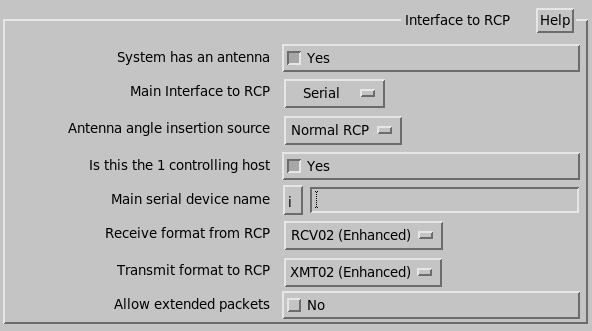
- System has an antenna
-
In most environments only the radar host systems have an antenna.
Select No for all analysis and display systems.
- Main interface to RCP
-
-
Network
This is the most common interface on RVP and RCP systems. It uses a multicast network socket to send and receive information from the RCP.
For network interfaces you must enter the multicast address, port number, interface, and network delay.
-
Serial
This is the legacy serial cable interface. You must also enter the serial device file name. For RVP systems using a serial tag interface to the RCP, enter Serial for the interface and Normal RCP for the angle source.
-
AntExport
Not recommended for general use. Allows a low-bandwidth remote host to get antenna control and status. All the other setup questions are removed because that information is automatically exported from the main RCP system.
-
None
On an RVP systems with a hardware interface for angle input (either parallel tags or synchro inputs) enter None for the interface, and Native RVP for the angle source.
For RCP and RVP interface configuration examples, see Network Export Overview.
-
- Antenna angle insertion source
-
Shows which angle source used to determine the current antenna position. Other information, such as the status and control bits always comes from the Normal RCP interface.
-
Normal RCP
The antenna angles arrive in the normal network packets from the RCP.
-
Native RVP
The RVP gets angles from a hardware source.
-
Native RCP
The RCP inherently knows the antenna position.
-
- Is this the 1 controlling host
- Select one of your computers to be the controlling host.
Network Interface Configuration Options
- Network Multicast Address
-
We suggest using the default address of 224.0.0.3. This is a "link-local" address which by default is not passed through routers and instead goes through switches and hubs.
If you need to go through a router, consider using the
site-localaddress 239.255.0.1.The strength of the multicast addressing scheme is that the antenna position information can go to several recipients simultaneously, so both the RVP and the IRIS host can receive antenna information. However, the packets may travel to other machines on the local network and cause network administrators to complain.
Be sure to set the same address and port number on RCP8 and RVP as needed. The multicast addresses have many reserved values, so if you have more than one RCP8 system at a site, we recommend using different port numbers, rather than different addresses.
- Network Port Number
- Suggested default of 30785. Increment from there if needed.
- Network Interface
-
Specify which Ethernet interface to use for the RCP communication.
If the antenna information does not need to leave the local computer, then use the loopback interface of
lo. - Average Network delay
- Vaisala recommends that you start with the default value of 0 ms here. This is the packet transmission delay from the RCP8 to the local system. For slow networks measure this by pinging RCP8 and enter half the average ping time.
Serial Interface Configuration Options
- Main serial device name
- Type the pathname of the device file for the serial port wired to the RCP. For
internal simulation, set this to blank.
You can freely substitute FIFOs for serial device files. What to do is based on the device name: If the device pathname ends in -x or -y, then IRIS assumes that we are opening a FIFO pair to be used in some sort of loopback mode.
For example, first create the FIFOs:
$ cd /etc/vaisala/irisrda
$ mkfifo ant_fifo-x ant_fifo-y
Then choose /etc/vaisala/irisrda/ant_fifo-x as the device name. IRIS writes to the specified FIFO, and reads from the other. If the RCP is a Vaisala RCP, choose /etc/vaisala/irisrda/ant_fifo-y as the RCP8/SiteHost serial port.
- Running at and with parity
-
Specify the baud rate and parity of the serial port.
For AntExport interfaces expect the following questions:
- AntExport hostname/IP-Address
- Type the host of the exporting system.
- AntExport Port Number
- Suggested default of 30745.
All Interfaces
- Receive format from RCP
- Enter one of the following antenna reception formats for both the main
and auxiliary:
- No Reception
- rcv01 (Original RCP)
- rcv02 (Enhanced RCP)
- rcv03 (Shipboard Format)
- rcv05 (Dual System)
- Scientific Atlanta 3860
- Transmit format to RCP
-
Enter one of the following antenna reception formats for both the main and auxiliary:
- No Transmission
- xmt01 (Original RCP)
- xmt02 (Enhanced RCP)
- xmt05 (Dual System)
- Scientific Atlanta 3860
- Allow extended packets
- For Vaisala radars, set this to
YES.
For information on the reception formats, see IRIS Programming Guide (M212927EN).