

Control Bit Definitions
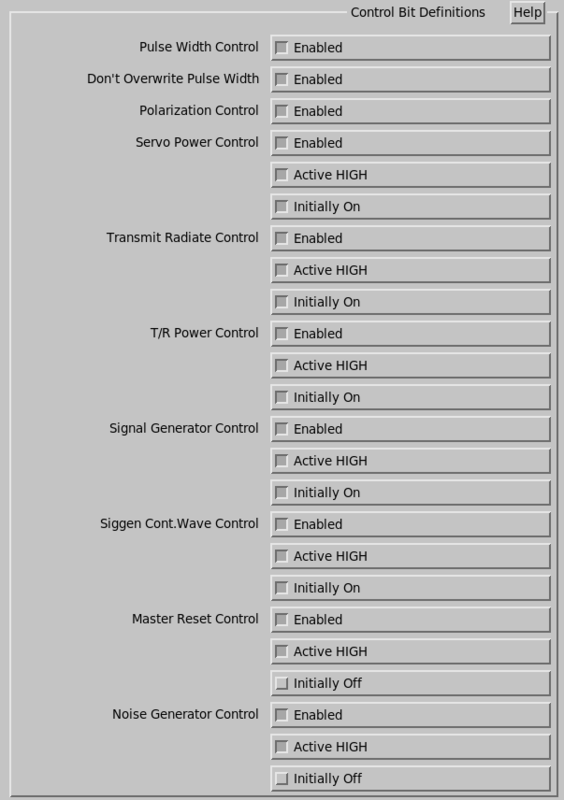
- Pulse Width Control
- Select either Disabled or Enabled. On driver powerup, the pulse width is not set until it is also set in the signal processor.
- Don't Overwrite Pulse Width
- Polarization Control
- Select either Disabled or Enabled. On driver powerup, the polarization is not set until it is also set in the signal processor.
- Servo Power Control
- Choose either Disabled or Enabled to indicate whether the antenna controller can control the servo power. 1
- Transmit Radiate Control
- Choose either Disabled or Enabled to indicate whether the antenna controller can control the transmitter radiation. 1
- T/R Power Control
- Choose either Disabled or Enabled to indicate whether the antenna controller can control the power to the transmitter and receiver rack.1
- Signal Generator Control
- Choose either Disabled or Enabled to indicate whether the antenna controller can control a signal generator for calibration purposes. 1
- Siggen Cont. Wave Control
- Choose either Disabled or Enabled to indicate whether the signal generator can be switched between Continuous Wave (CW) and pulse mode. 1
- Master Reset Control
- Choose either Disabled or Enabled to indicate whether the antenna controller can be reset. 1
- Noise Generator Control
- Choose either Disabled or Enabled to indicate whether the antenna controller can control a noise source for receiver testing and calibration purposes. 1
1 If enabled is selected, an option for
Active HIGH or Active LOW appears as
well as an option for Initially Off or Initially
On.