

Track/Annotate Tool
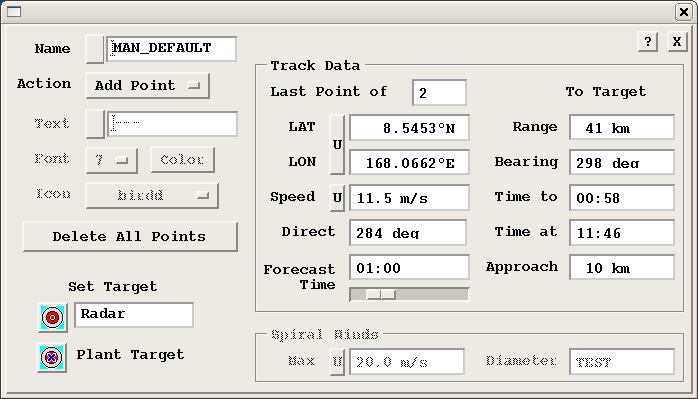
The Track/Annotate tool makes it easy for forecasters to manually:
- Make and edit interactive storm tracks.
- Determine time of arrival, time to arrival and distance of closest approach to a selectable "target" point (similar to a home point in the cursor mode).
- Add annotation text in various font sizes and colors.
- Add bitmap icons.
- Determine the center of a typhoon spiral.
The left side of the menu contains the control of the next the cursor action and selection of the forecast target point.
The right side of the menu contains the track and forecast information, such as the position of the most recent track point and the distance, bearing and time of arrival from the most recent track point to the selected target point.
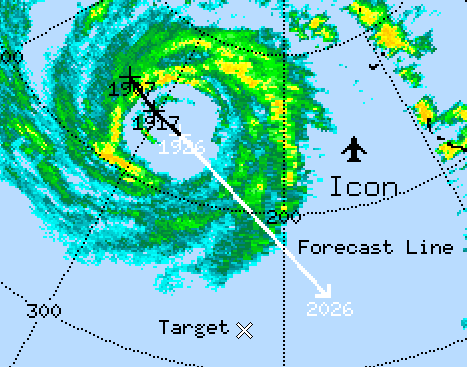
Example of Track Points, Icons and Annotation
The elements of a track are shown in the example above.
- Track Points are indicated by the "+" with the time displayed beneath each one. Note that the latest track point at 1926 is highlighted since this corresponds to the frame that is currently displayed.
- Forecast Line or arrow shows the expected position of the echo, in this case, in 1 hour. This line is also displayed in the highlight color to distinguish it from the track line.
- Icon in this case is an airport symbol.
- Annotation examples are the text "Icon", "Target" and "Forecast Line".
- Target for the forecast is indicated by the "X" symbol. This is used for forecasting the time of arrival at a position.
 Target Information
The "Target" is a geographical position that you use for forecasting purposes such as an airport or urban area. The default target position is at the radar site, but you can select the target from a list or plant a target with your cursor, similar to home points in the cursor menu.
The list of Target points is the same as the list of Home points. These can only be saved or deleted by the operator. See Cursor Tool.
Once you have set your target, the target information shows:
- Range and Bearing
- To target from the most recent track point. In the example, the target bears 118° and 19 km.
- Time to (target)
- The time to the closest approach of the track to the target.
- Time at
- The clock time of when the echo makes its closest approach.
- Approach
- The distance of closest approach as measured from the track line to the target.