

WARN Output Options
IRIS WARN centroids are displayed as an ellipse with a name inside or as a graphical icon rotated to the direction of motion of the centroid.
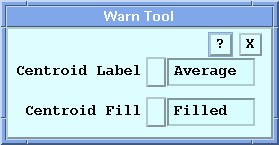
Centroid Label
The Centroid Label options are for a second label line on ellipses or for a label to the right of the icon.
The WARN centroid has 4 label choices. The data displayed is from the first of the 3 possible inputs to the warning. The units are the same as in a standard IRIS data display, except that wind shear is displayed as knots loss/gain, and height is displayed in kilofeet.
- None
-
No additional label.
- Maximum
-
The centroid is labeled with the maximum value of the data throughout the centroid.
- Average
-
The centroid is labeled with the average value of the data throughout the centroid.
- Speed
-
The centroid is labeled with the speed of a target. This only applies to systems that have the DWELL product configured for target detection.
Centroid Fill
The Centroid Fill options apply to ellipse-style displays when the WARN product is overlaid on other products.
You can choose the style for the fill effect of the centroid so that it can be clearly identified on your display. The options are:
- Open
-
The centroid area is not filled, it is outlined.
- Hatched
-
The centroid area is filled with a slanted pattern of lines.
- Filled
-
The centroid area is filled a solid color.
Operational Use
Configure your Warn Tool options and then, in Display Options, select a product to overlay.
Select to save the Warn Tool options.