

WIND and FCAST Output Options
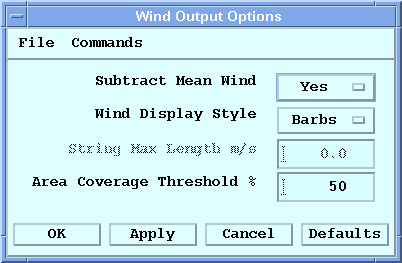
- Make sure WIND or FCAST is the current product type.
-
Select Options.
The Wind Output Options menu appears with options for plotting the horizontal wind speed and direction.
-
Define the WIND display options.
- Subtract Mean Wind
-
Select Yes for IRIS to subtract the mean wind vector from all wind vectors and display the perturbation wind vectors.
Select No to display the full wind vector.
- Wind Display Style
-
Display the WIND product vectors as wind barbs or wind strings.
The WIND vectors are estimates of horizontal winds using a uniform wind algorithm in sectors around the radar.
Wind barbs point toward the wind direction, with hatch marks denoting the wind speed following the standard meteorological convention of 1/2 barb for 5 knots, full barb for 10 knots, and triangles for 50 knots.
Wind strings point away from the wind direction, with the length of the string indicating the relative wind speed (the longer the string, the higher the speed).
- String Max Length
-
If you choose Strings as the wind display style, enter the maximum string length in meters/second.
Any data point that exceeds this length is displayed at the maximum length.
- Area Coverage Threshold %
- Add threshold points for which the aerial coverage of radial velocity data is less than the selected value. A value of 50 % is typical.